
From Robots To Realities: Engineering Extended Reality for Learning and Collaboration
Andrew Rukangu
Major advisor: Dr. Kyle Johnsen
Committee: Dr.John Morelock, Dr. Beshoy Morkos, Dr. Fred Beyette
10/21/2026

Consumer Mixed Reality Can Become Both a Learning Tool and a Research Instrument
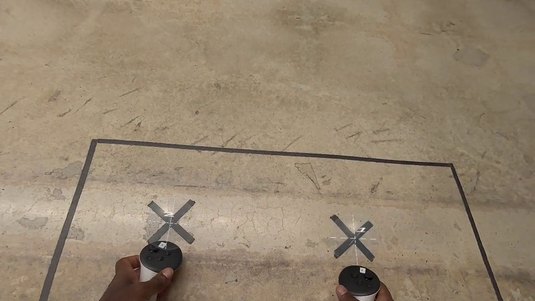
Making XR practical
The XR spectrum, and how we engineer it for practical use: alignment, networking, recording
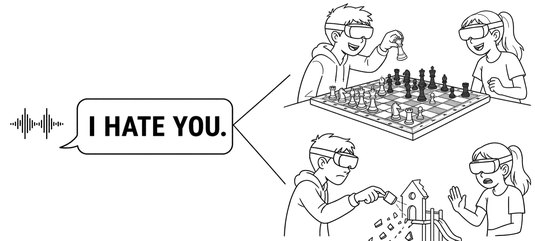
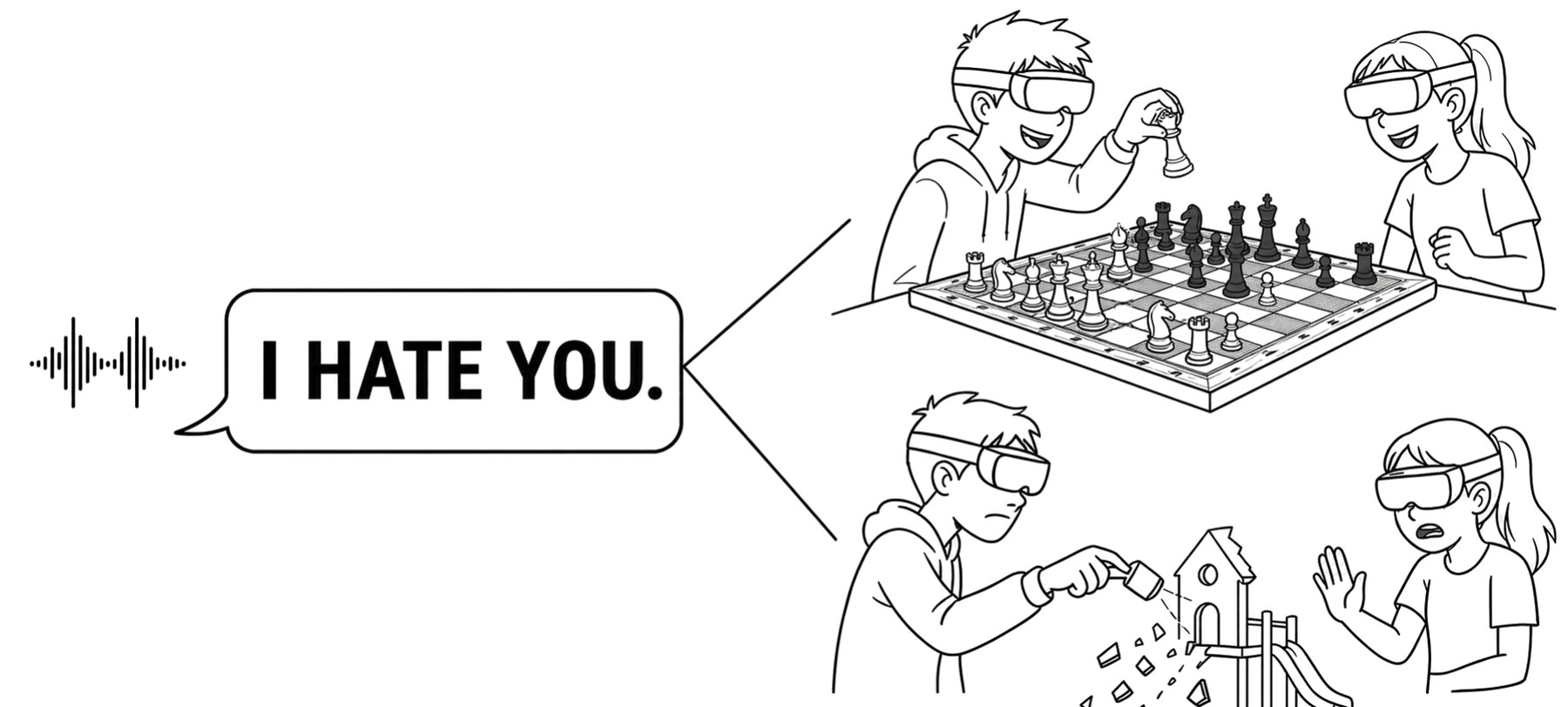
Speech as a measure
How the audio XR already records becomes an unobtrusive measurement channel
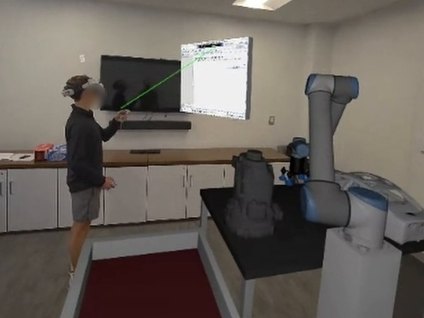
A learner beside a life-size robot
What happens when learners program a true-scale robot themselves
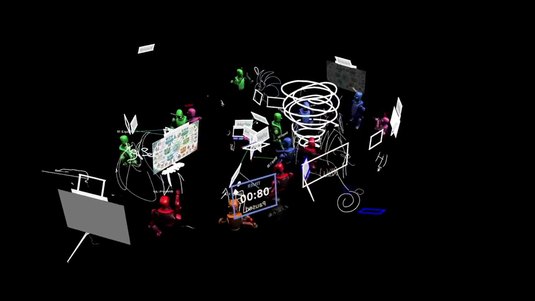
Collaboration at scale
How groups share one MR space, and how we enable it
What are these realities anyway?
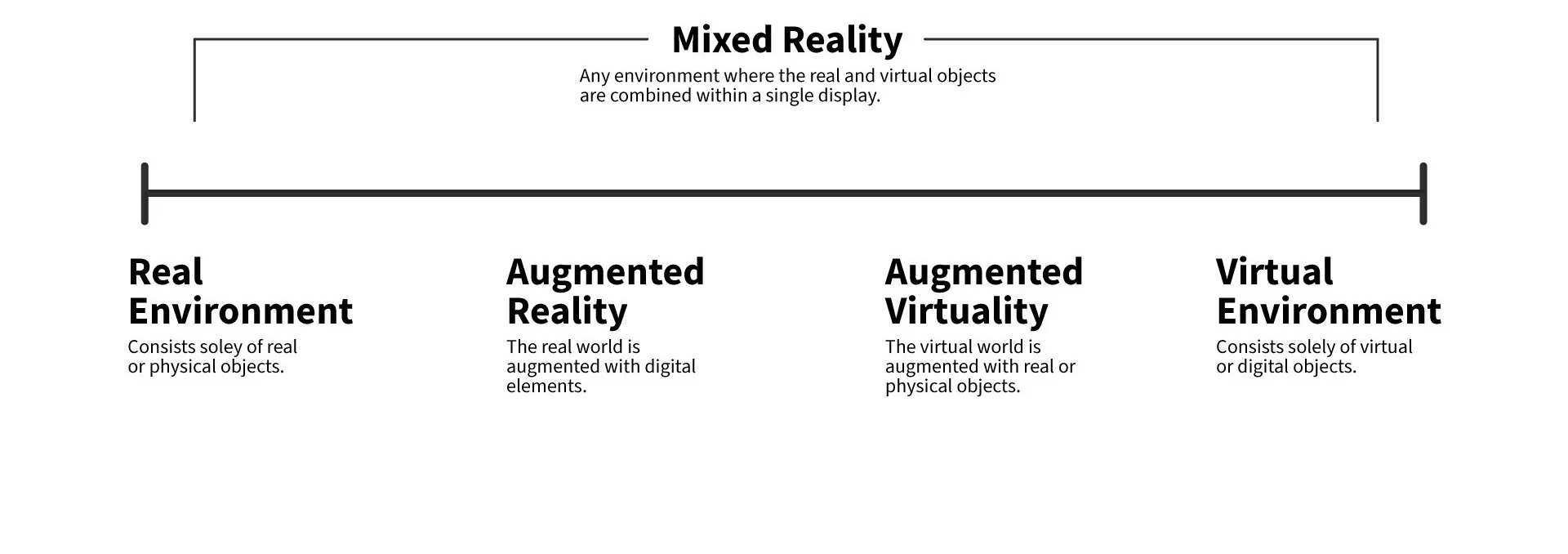
https://ixdf.org/literature/topics/virtuality-continuum
eXtended Reality (XR)
What are these realities anyway?
MR
VR
Practical Mixed Reality (MR) Needs Alignment and Networking
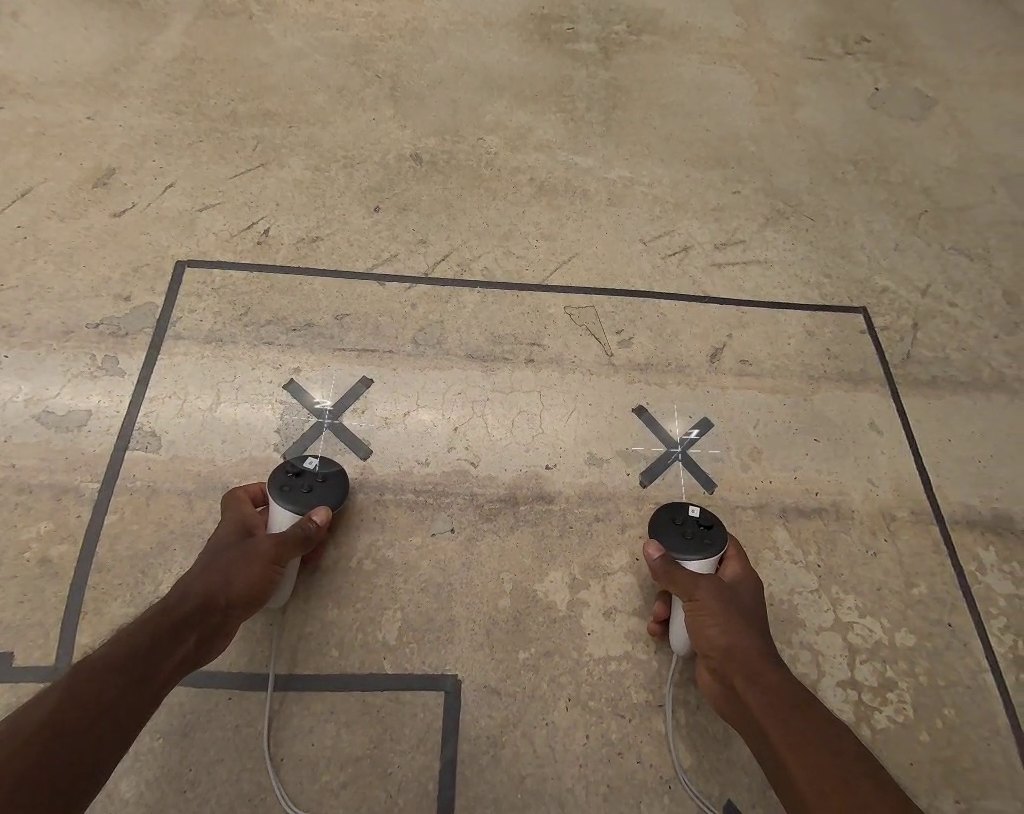
y
z
XR Lets Us Study People in Almost Any Setting
Almost any use case


training

Meetings

education

exposure therapy

designing together

games and play
Interfaces built for 3D
From mouse to hands



2D
Embodied
Getting around (locomotion)

walk

steer

teleport
What studies record
objective telemetry

where they
were

how they
moved

what they
did

physiology,
if available
subjective reports

surveys and
questionnaires

follow-up
interviews
Coding What People Say by Hand Does Not Scale

3,000 coding units
each could be a paragraph or sentence

× 4 codes
= 12,000 yes/no decisions

A new code turns up
reread all 3,000 units (worst case)

A second coder for reliability
double everything
Studies Code a Small Sample or Count Words Instead

Triage
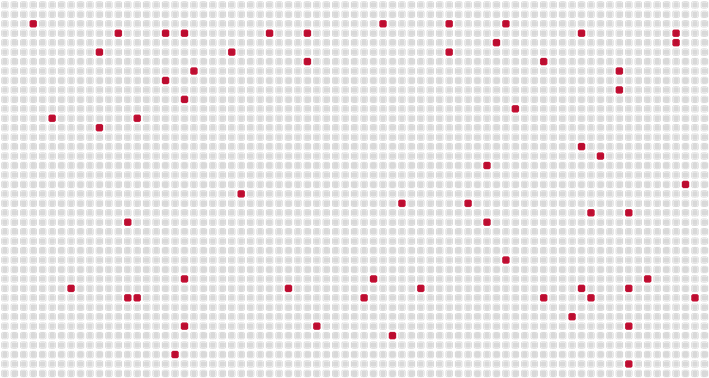
Code a small sample, often the participants
whose numbers looked unusual/interesting

Most of what people said goes unread

Conversational metrics
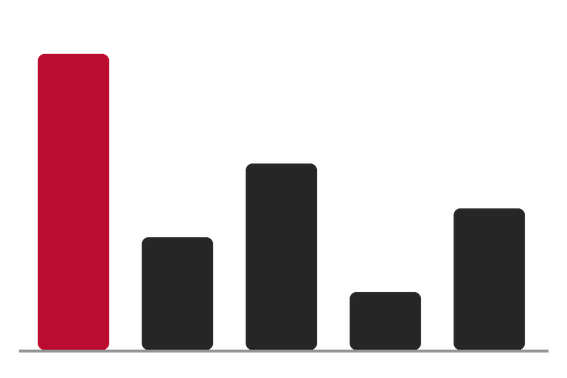
Who spoke most: word counts,
speaking time, turns

What they said is lost
LLMs Can Code Every Unit, With a Human Steering

LLMs work natively on text, so they can apply a written code definition to every unit

One code at a time
a yes/no decision per code,
so the codes don't bleed
into each other
κ .60 → .68 (Dunivin, 2024)

Reason before deciding
a chain-of-thought rationale
for every decision
κ .59 → .68 (Dunivin, 2024)

Calibrate with a human
a human and the models code
the same sample; definitions
and examples are revised
until they agree
(Chew et al., 2023)
Frontier LLMs Are Closed and Off-Site, So We Run an Ensemble Locally

ChatGPT

Claude

Gemini
New capabilities arrive at a rapid pace

Closed, so not repeatable
18 studies that used OpenAI models: 5 could run, 0 fully reproduced
(Angermeir et al., 2026)

Speech is sensitive data
An IEEE XR ethics report lists speech among the XR data that can adversely affect a user's privacy
(McGill, 2021)
institutional hardware

Gemma-3 27B
Llama-3.3 70B
Llama-4 Maverick
GPT-OSS 120B

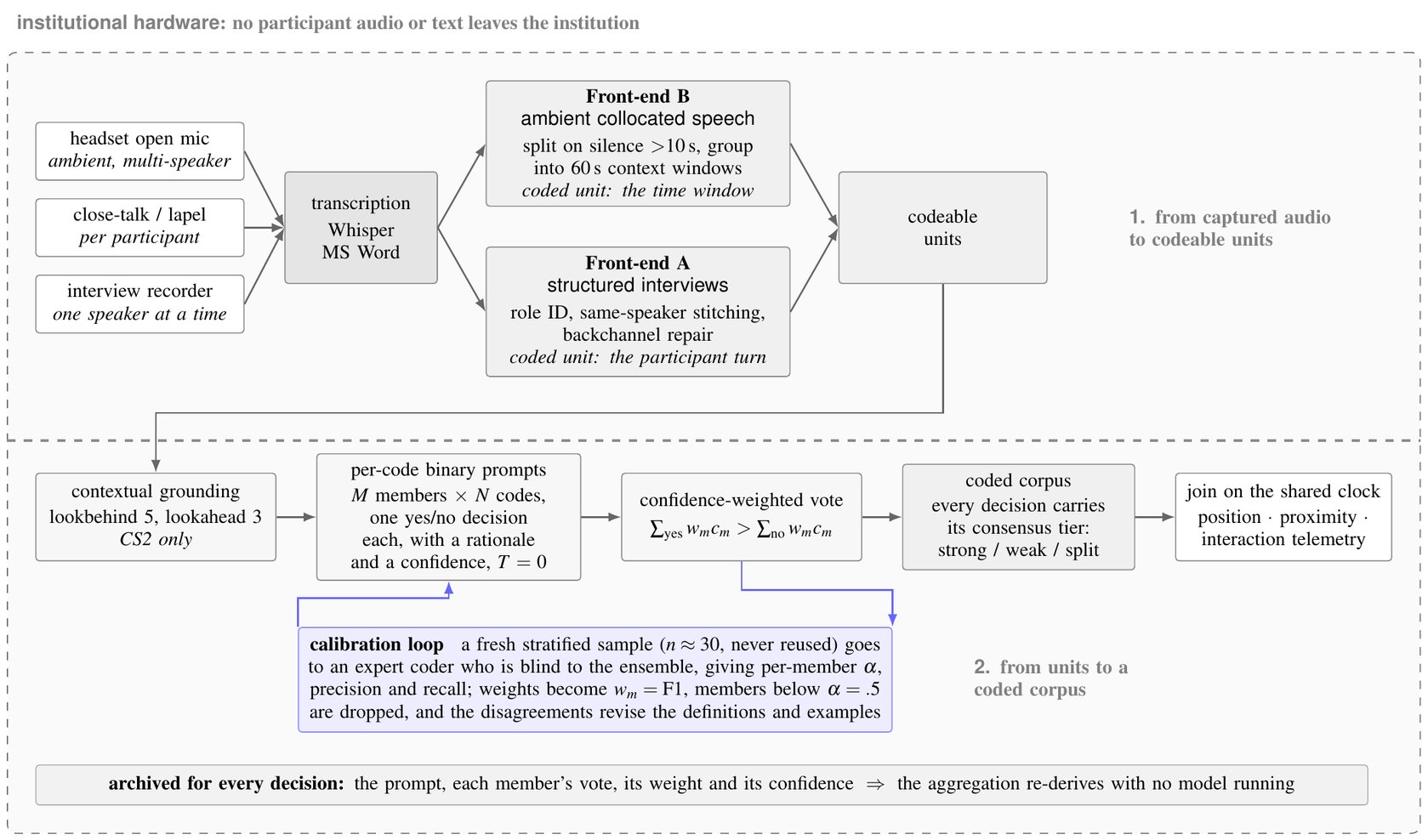
Once transcribed, no audio or transcript leaves the institution

Every vote, weight and confidence archived: the analysis re-derives without running a model
Lost one of five models to a policy change mid-study: all five main findings held
Existing Tools Help a Person Code; They Do Not Code a Speech Corpus Unattended

Human-in-the-loop tools
CollabCoder
PaTAT
MindCoder
CoAIcoder
SenseMate
Built to assist a person, so someone must be available to code

They add time: SenseMate +49 s per coded unit

Closest: Kamen and Kamen (2025)
10 models, equal votes, scored against known answers
This work

Each vote weighted by its agreement with a human coder, on this codebook

We tested it in the wild
Speech Arrives in Fragments, So the Pipeline First Builds Codeable Units

Post-study interviews
One speaker at a time; questions and answers
interview recorder

Open-mic sessions
Several people talking while they work
headset open mic + a close-talk mic per participant for who spoke
Natural speech is fragmented and non-linear
Audio capture
Front ends
Codeable units
Back end
Front End A Turns Interview Fragments Into Participant Turns

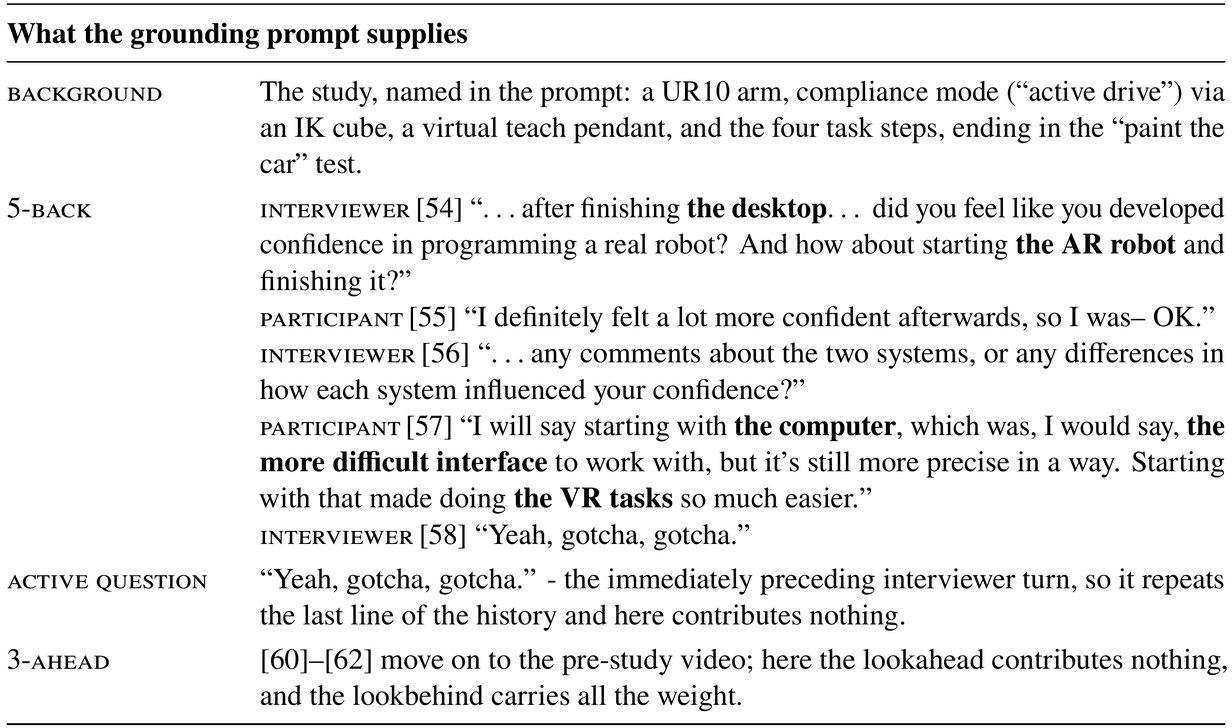
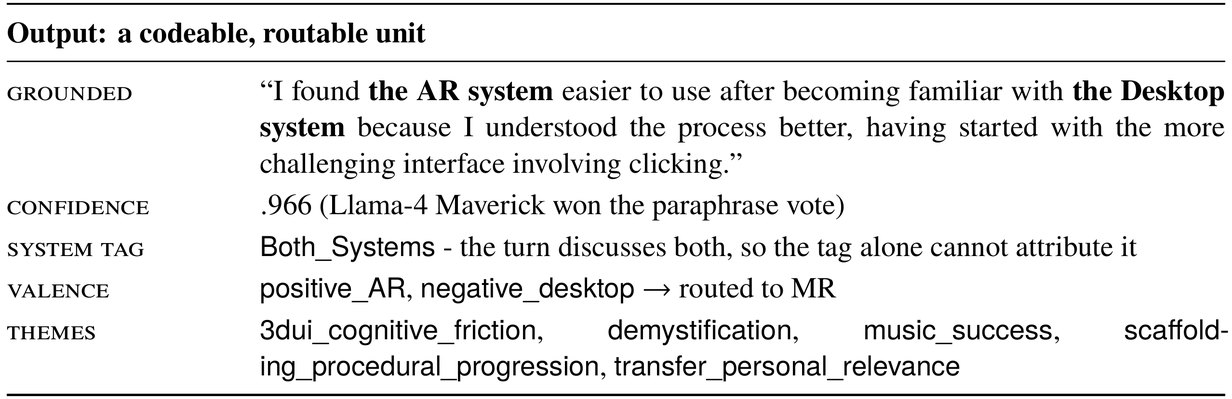
1,169 codeable units from 30 post-study interviews
994 participant turns from 22 Study 2 interviews; 175 from 8 Study 1 interviews
Original turn
Context
Output
Front End B Splits Open-Mic Audio on Silence
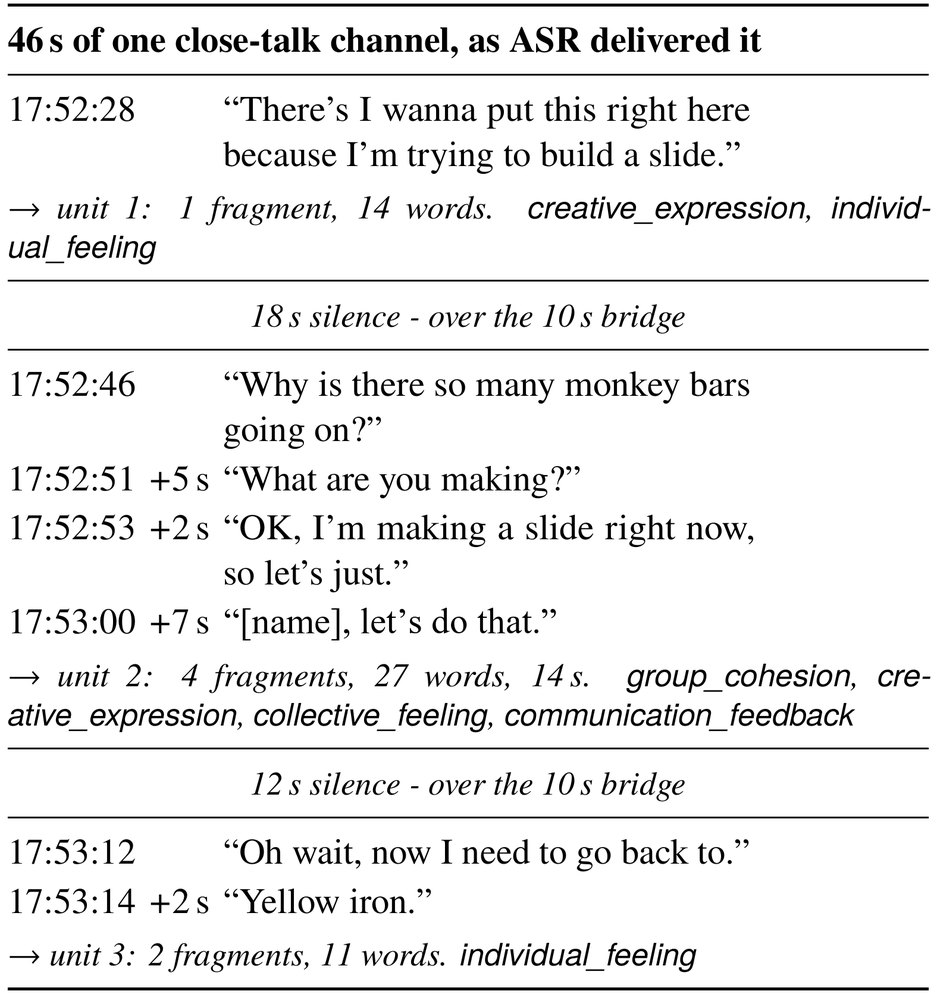

120 recordings
14,870 fragments → 2,894 units
Several Models Code Every Unit, and Alignment with Human(s) Increase a Model’s Vote Weight
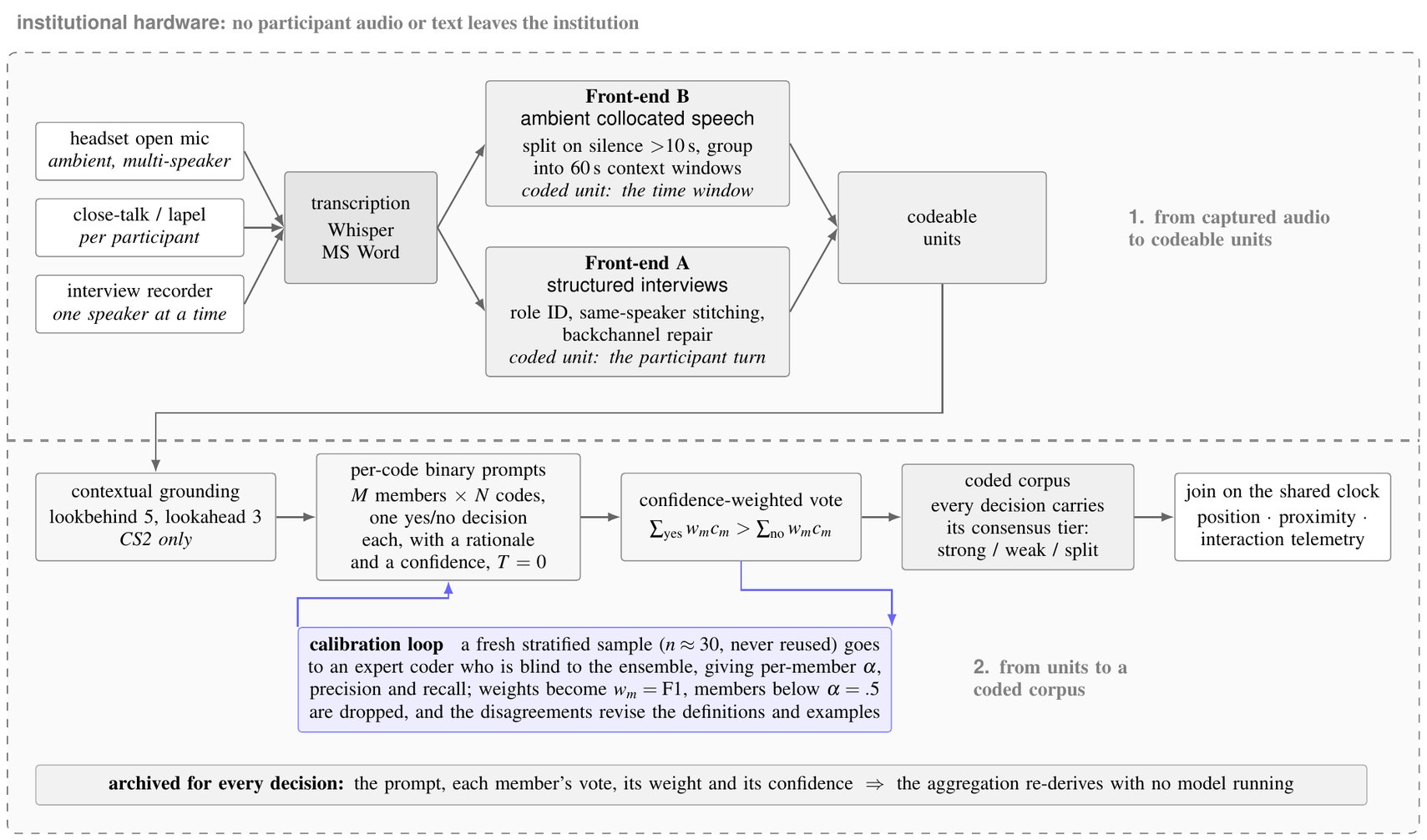
Audio capture
Front ends
Codeable units
Grounding
Per-code prompts
Weighted vote
Coded corpus
Human calibration
Archive
Run on Public Datasets, the Pipeline Fell Within the Range of Human Annotators
AnnoMI therapist behavior
.67
.87
.72
AnnoMI client talk
.54
.84
.72
GoEmotions
.29
.51
.46
0
.5
1
grey: range of human annotators · red: pipeline · Krippendorff's α, 0 to 1

Archival study
All three versions reproduced the published direction of the findings

Best single model ≥ vote
While not more accurate than all its members, the ensemble allows us to pick the best member
Your Turn: Which Emotions Does Each Reddit Comment Express?
qual-demo.rukangu.com
1
Enter a name (shown to the room; no email or password)
2
Tick the emotions in five Reddit comments
3
Compare your choices with the room and with three language models
Comments from GoEmotions (Demszky et al., 2020)

A Local LLM Pipeline for Coding XR Speech
Lessons on Grounding, Calibration, and Ensemble Reliability · under review at CHI 2027
Andrew Rukangu · Yuqian Ni · Jordan Smothers · Sun Joo (Grace) Ahn · Kyle Johnsen
Learning to Program a Real Robot Is Limited by Access, Cost, and Risk
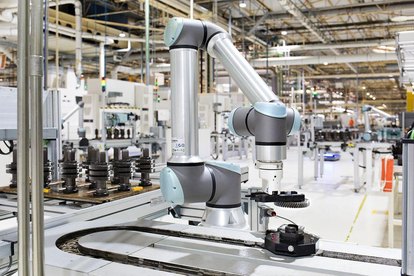
Costly and shared
Shared across courses and research projects, so access depends on schedules and supervisors

Unforgiving
Beginner mistakes can injure the learner or damage the equipment
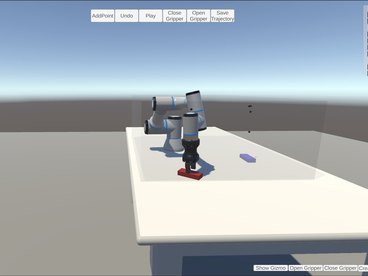
Workarounds lose something
Miniatures lose scale and safety realities; remote labs run programs in batches; desktop simulators turn a 3D task into 2D mouse movements
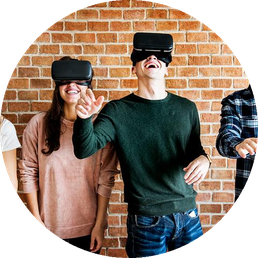
MR can bring several users together
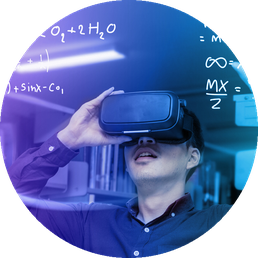
MR can bring models into the environment

MR can connect remote users
Immersion Raises Presence, but Whether It Builds Confidence Is Unsettled
What is known
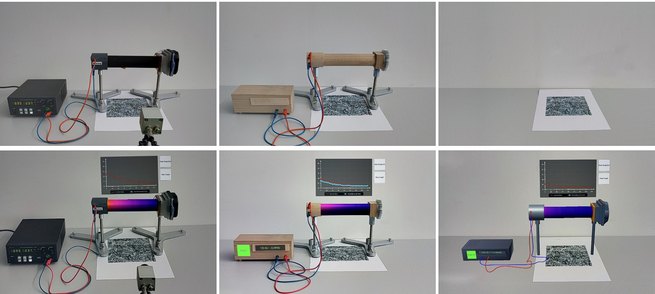
Physical setups and their AR equivalents (Knierim et al., 2020)
AR/VR can stand in for tangible labs (Knierim et al., 2020; Franzluebbers et al., 2021), though not always (Peeters et al., 2023)
MR robot programming can be faster with lower workload (Gadre et al., 2019)
Immersion raises presence and agency, but not always self-efficacy (Petersen et al., 2022)
Few immersive systems give the instructor a role (Radianti et al., 2020)
Our two studies
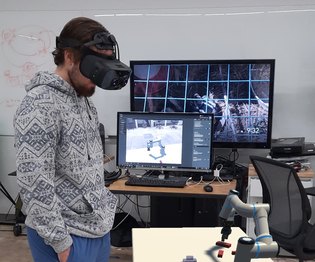
Study 1
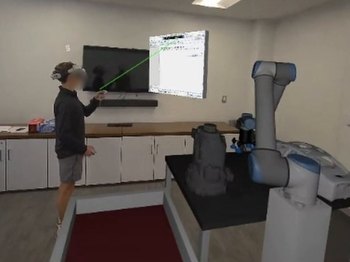
Watch a life-size physical or AR robot after desktop programming → motivation
Study 2
Program the robot yourself in MR or on a desktop, same content → self-efficacy
Why compare with a desktop
91% vs 4%
of undergraduates had a laptop vs an AR or VR headset (Galanek et al., 2018)
Familiar controls give it a fluency advantage

Study 1: Students Programmed a Desktop Robot, Then Watched a Life-Size Robot Run the Task
Andrew Rukangu · John R. Morelock · Kyle Johnsen · Deborah O. Moyaki · Computers in Education Journal, 2025
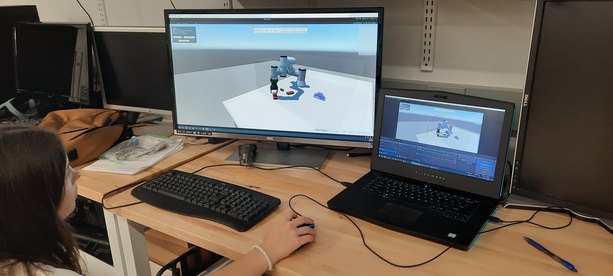
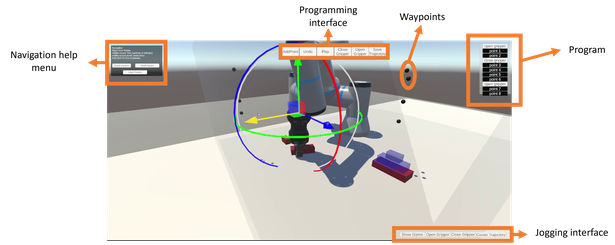
1 · Desktop tutorial
2 · Stack three blocks into a pyramid
3 · Watch the task on a physical UR10…
…or a life-size AR UR10
8 first- and second-year students, 4 per robot · 90 minutes · then a MUSIC interview
A Physical Robot is more useful. AR robot is Interesting. Desktop Robot builds success.
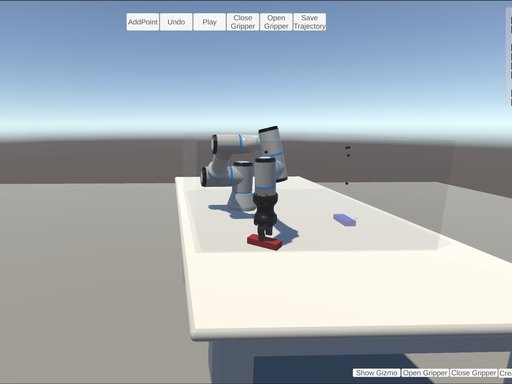
Desktop robot
Interest and success
“It was presented in a game format”
Every student solved the pyramid task, after 2 to 9 resets
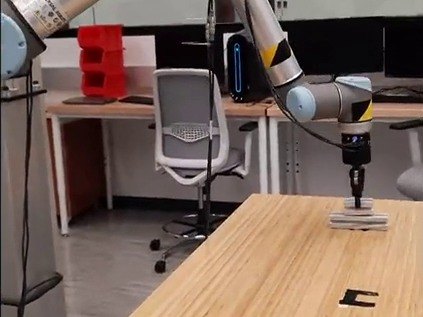
Physical robot
Usefulness
“whatever I can do virtually I can do physically too”
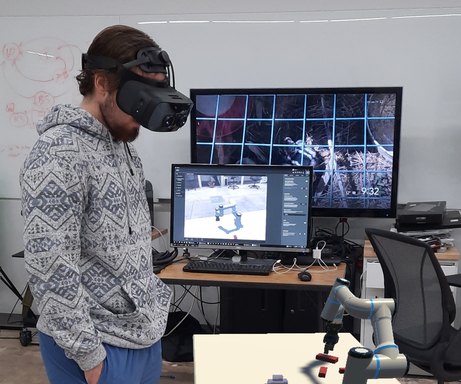
AR robot
Interest, through novelty
“I've never used VR so it was cool seeing it”
All 4 AR students mentioned its novelty, against 1 of 4 in the physical group
Success and empowerment were similar across groups. The LLM pipeline later reproduced the usefulness and interest contrast.
Study 2: 22 Novices Programmed the Robot in MR and on a Desktop
Andrew Rukangu · John Morelock · Beshoy Morkos · Kyle Johnsen · to be submitted to IEEE TVCG
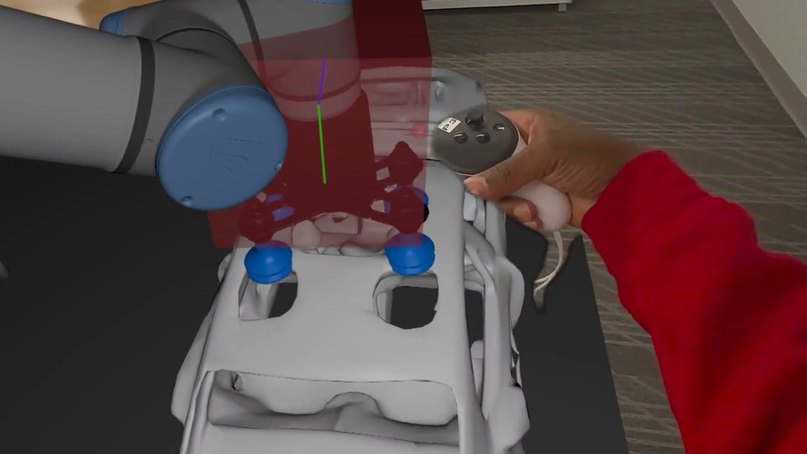
MR: grab the control cube (Meta Quest 3)
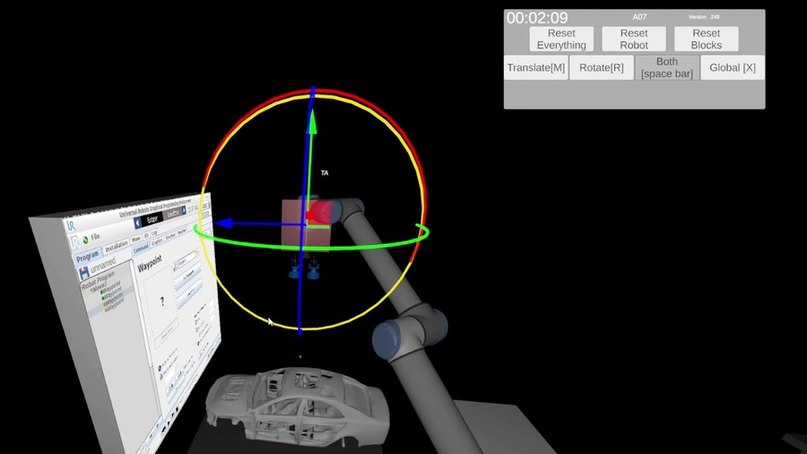
Desktop: drag the cube with a gizmo
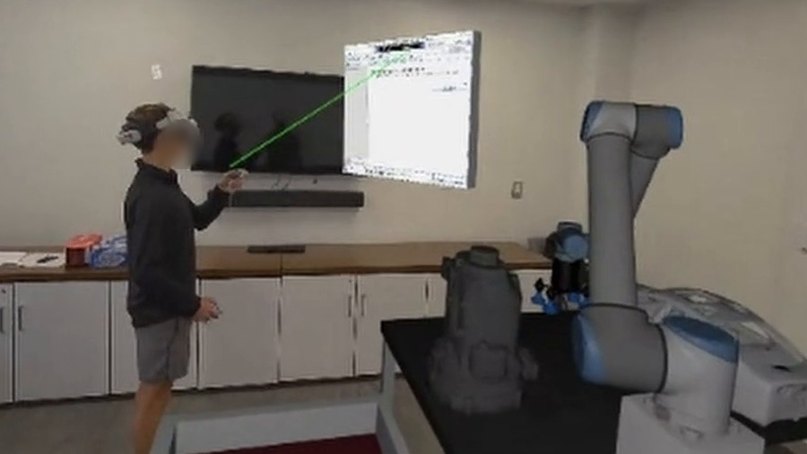
Instructor in the loop: in the shared space, seeing the learner's laser
Baseline self-efficacy
Pre-study lesson (once)
Interface 1: tutorials, paint-the-car task
Surveys
Interface 2: same steps
Surveys
Interview
Counterbalanced: 11 desktop-first, 11 MR-first (gender-stratified) · 22 novices · 90 to 150 minutes
After each interface: self-efficacy, usability, workload (NASA-TLX), presence, NPS · robot telemetry at 10 Hz
Situated Isomorphism in MR: Embodied 1:1 Interaction, Lifesize Robot
Mixed reality (Meta Quest 3)
Desktop (mouse and keyboard)
Situated Isomorphism Increases Confidence
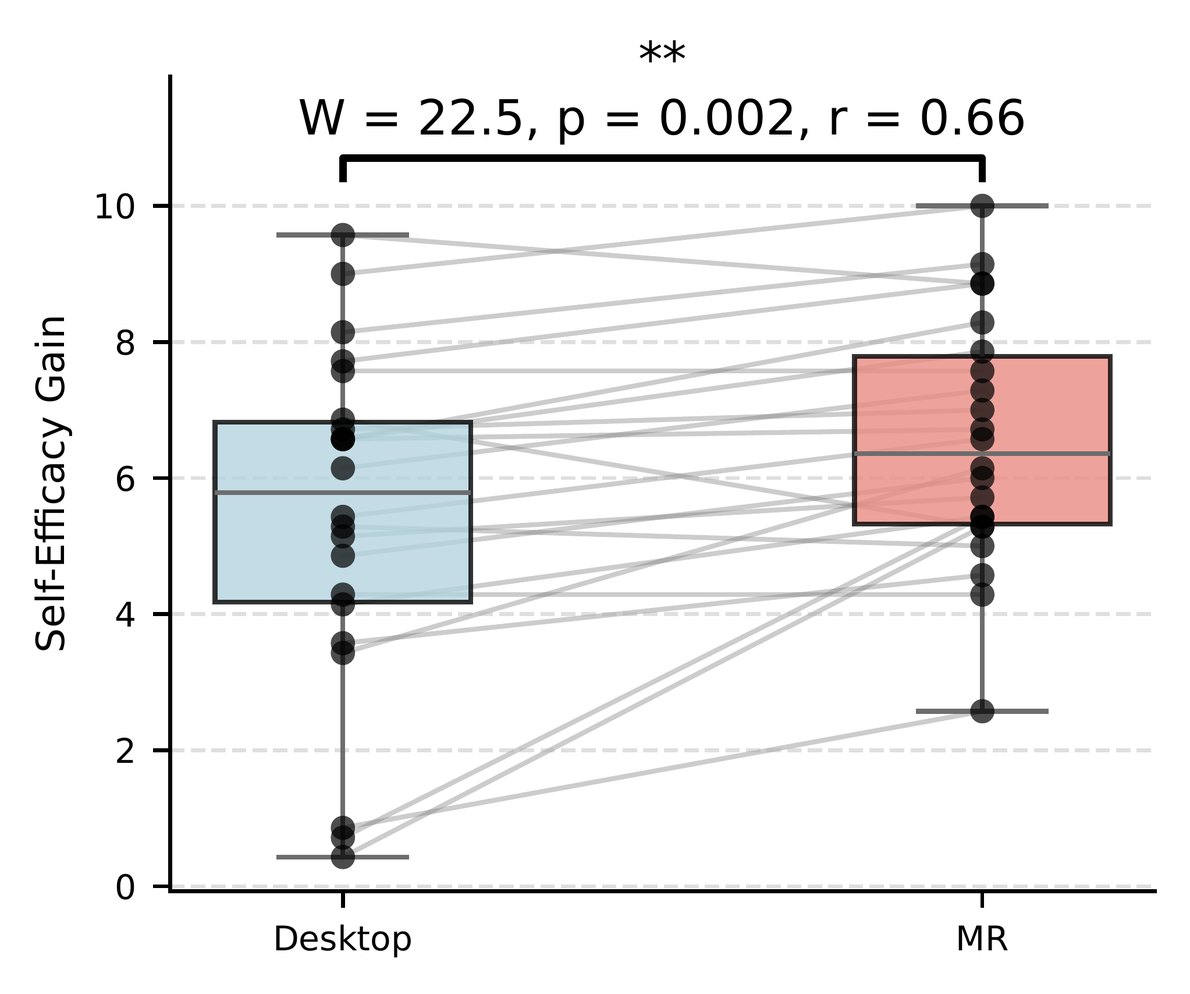
Self-efficacy gain
MR 6.54 vs desktop 5.44 (p = .002)
Higher in MR for 17 of 22 learners
Held in first sessions alone (+1.02, p = .034)
No order effect
Self-efficacy: belief in one's ability to do the task, 0–10
MR Was More Present and Less Demanding, Without Slowing the Task
Presence
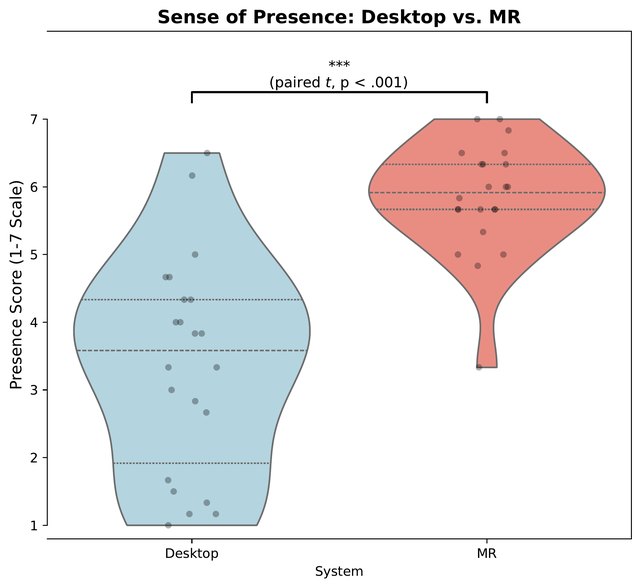
MR 5.84 vs desktop 3.38 (p < .001)
Held in first sessions
Workload
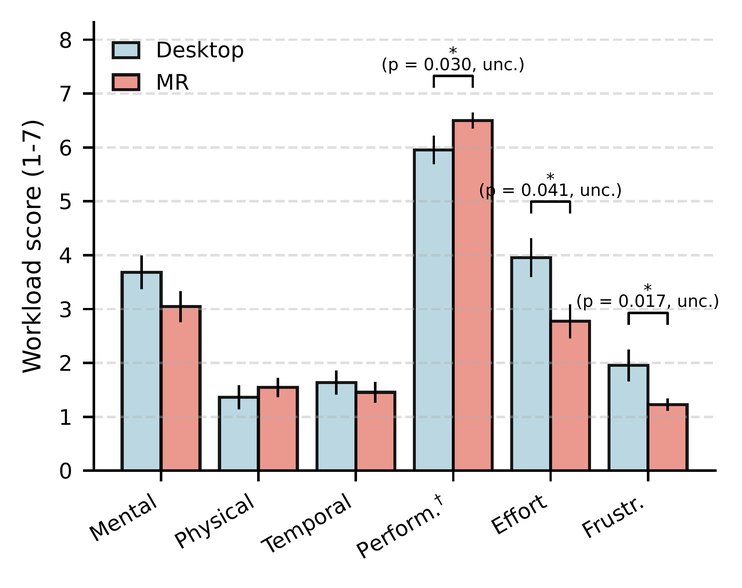
MR 1.92 vs desktop 2.44 (p = .020)
No single subscale survived correction; physical demand was not higher
Usability
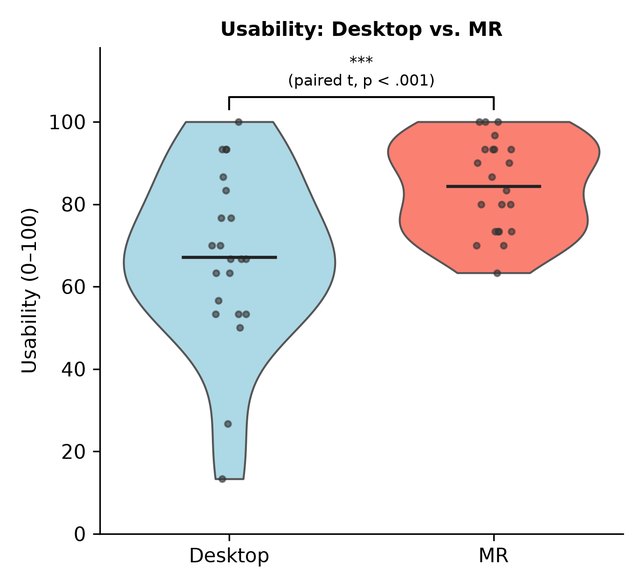
MR 84.4 vs desktop 67.1 (p < .001)
But not different in first sessions alone

Time: interface tutorial 118 s in MR vs 252 s on the desktop; main task no difference (726 s vs 813 s)
Learners Found MR Intuitive and Interesting, and the Desktop a Source of Friction
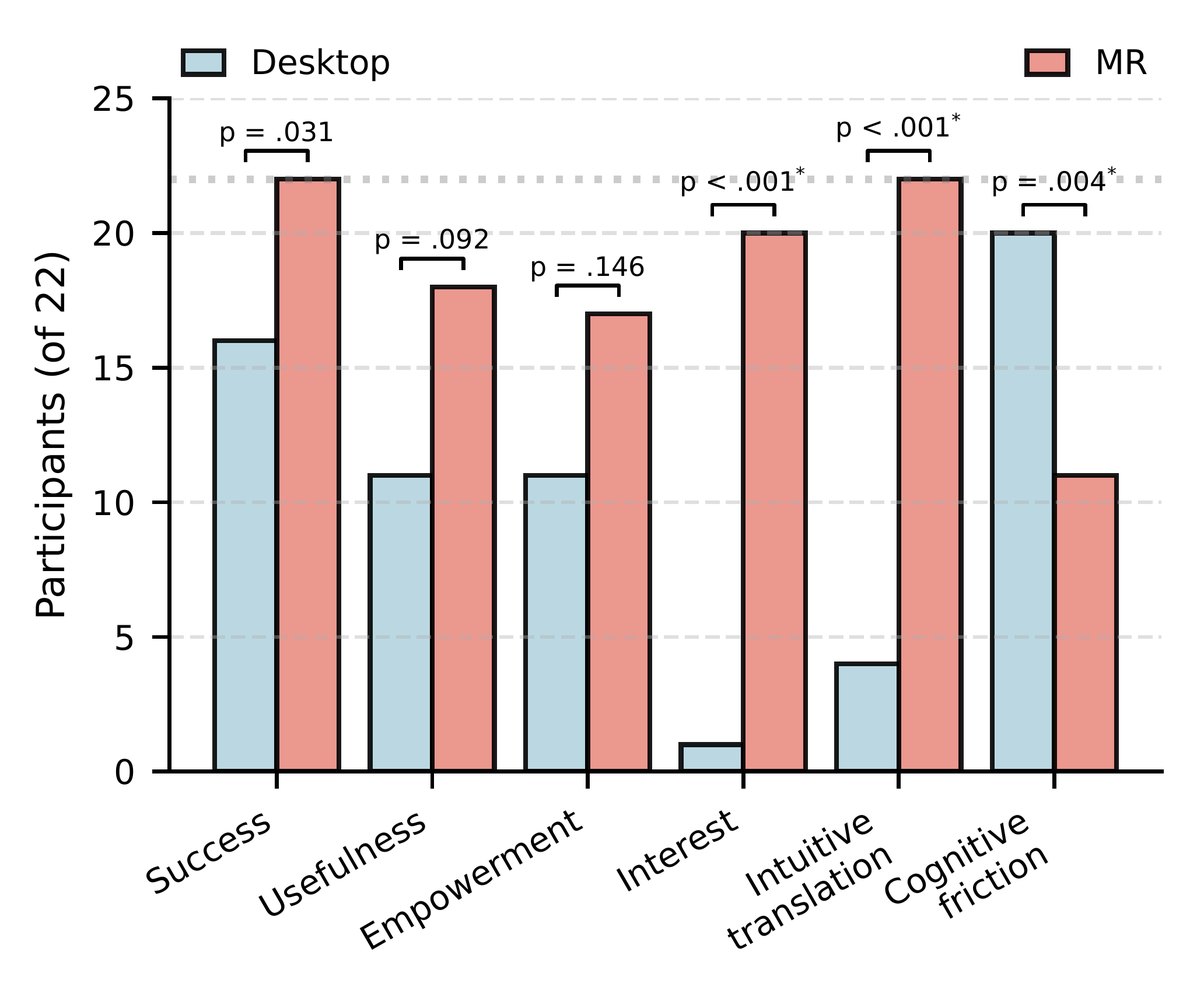

“robots are like XYZ versus the mouse, where you have to keep panning”
“you could physically grab it”
Coded by the LLM pipeline (α = .76 with the human calibrator)
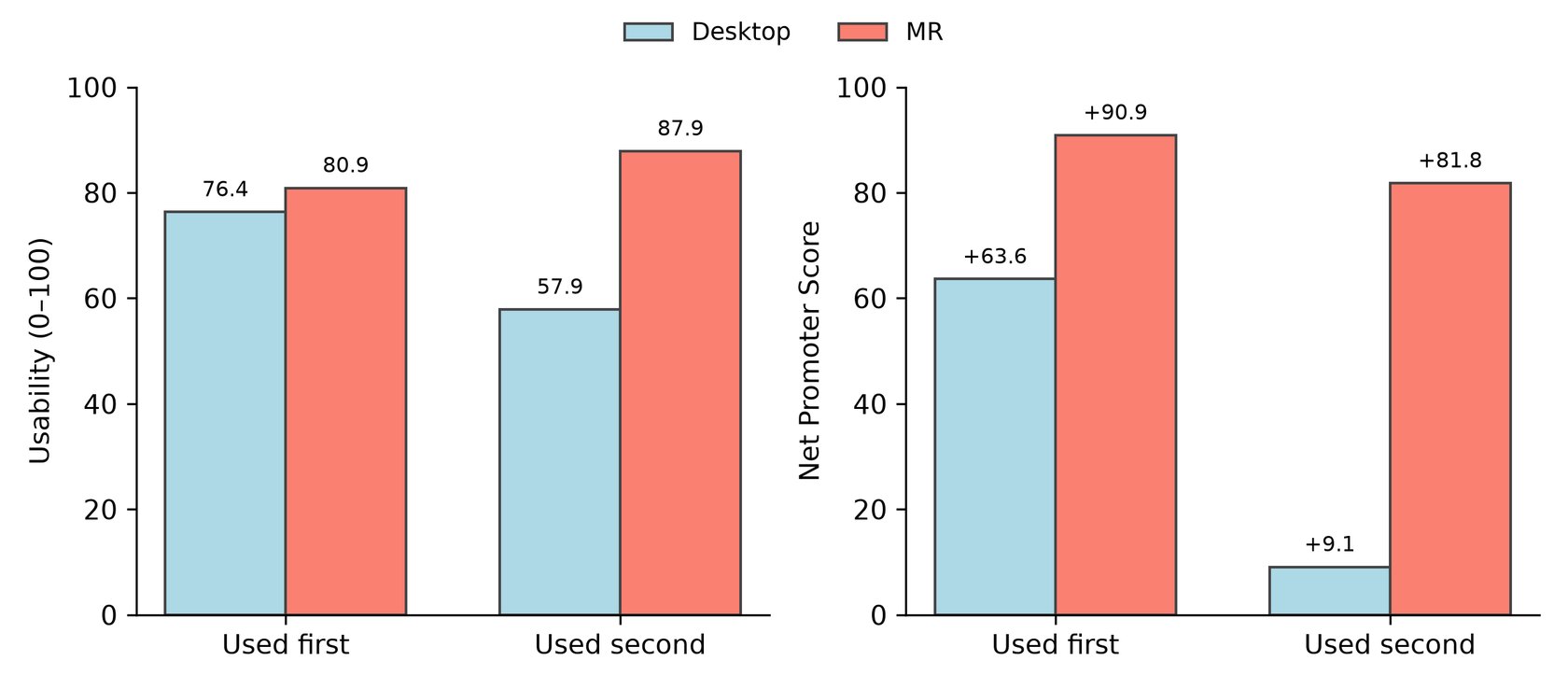
The Desktop Was Rated Well First, but Much Lower After MR
Desktop usability
76.4 when used first, 57.9 after MR
Desktop NPS
+63.6 when used first, +9.1 after MR; all four desktop detractors had used MR first
Self-efficacy gain
Did not depend on order (p = .78)
Recommendations: Start on the Desktop, Then Move to MR
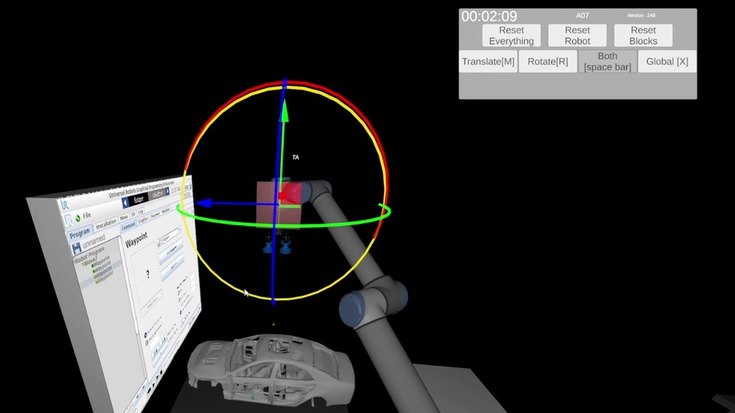
Desktop
Precise input and familiar controls
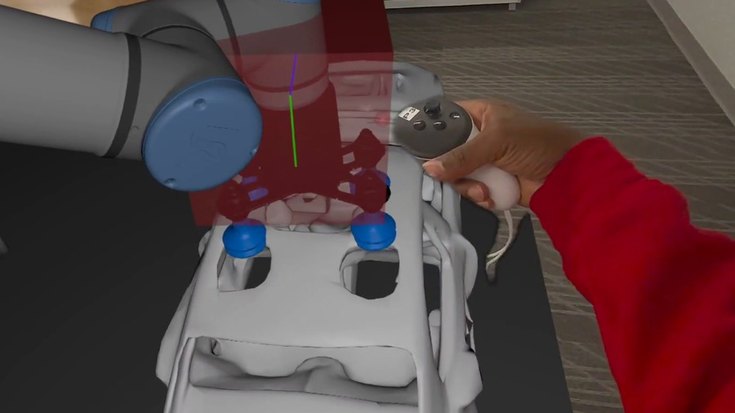
Mixed reality
True scale, one-to-one manipulation, and more self-efficacy
Future work
Does the self-efficacy built in MR carry over to a physical robot?
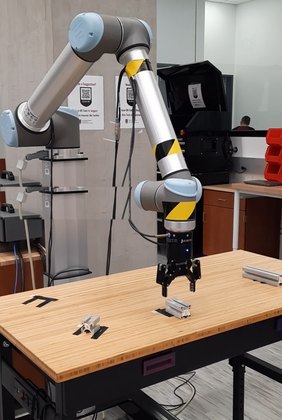
Whole Rooms Can Now Share MR, but Studying Them in the Field Is Hard
People sharing one immersive space
Immersive sketching studies
1–2
Gasques 2019; Drey 2020; Machuca 2023
Collaborative VR mind-mapping
4
Yang et al., 2024
DrawnTogether
up to 16
this work
The field is hard

Weak or no Wi-Fi

Short setup windows

Consent and assent for minors

Closed platforms share only the data they choose (Saffo et al., 2021)
So co-located MR is usually shown as a one-off prototype, not evaluated in controlled field studies
DrawnTogether: Up to 16 Headsets Drawing in One Shared Space
Andrew Rukangu · Yuqian Ni · J. M. Payton · K. Norris · Sun Joo (Grace) Ahn · Kyle Johnsen · submitted to IEEE VR 2027
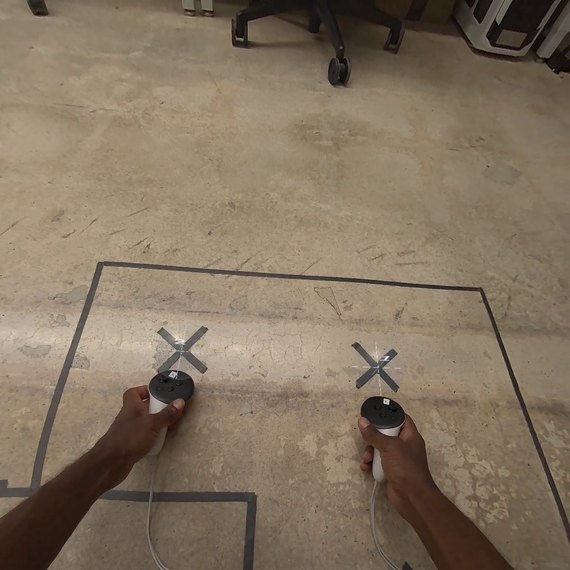
Align: two floor points, saved on each headset
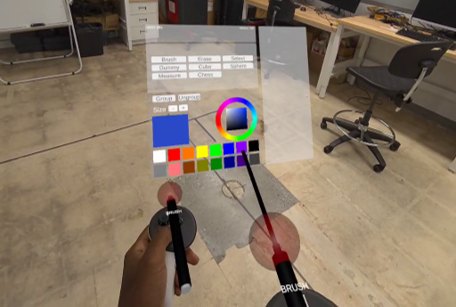
Draw in mid-air; move, resize or erase anyone's work
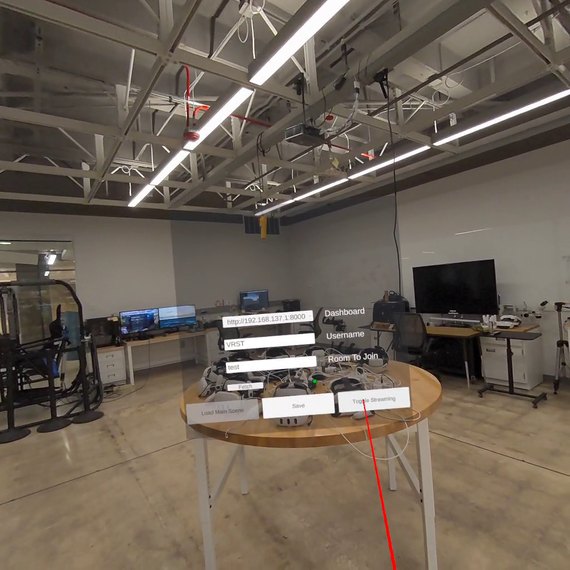
Join a room; the research team configures it
Meta Quest 3 in passthrough · up to 16 co-located headsets · VelNet on a local server
One laptop joins every session as a silent peer and records all network traffic, so each session can be replayed afterward
Two Summer Camps: 170 Consented Adolescents Across 26 Sessions
Year 1: three summer camps
53 consented, mean age 12.7
Groups of 5 to 13
Design “the most fun but feasible playground”
About 20 minutes, offline router
Year 2: Mini-Medical School
117 consented, mean age 15.1
Groups of 8 to 12, in subgroups of 3 or 4
Concept map: “What makes a good medical doctor?”
16 sessions: 8 global view, 8 local view
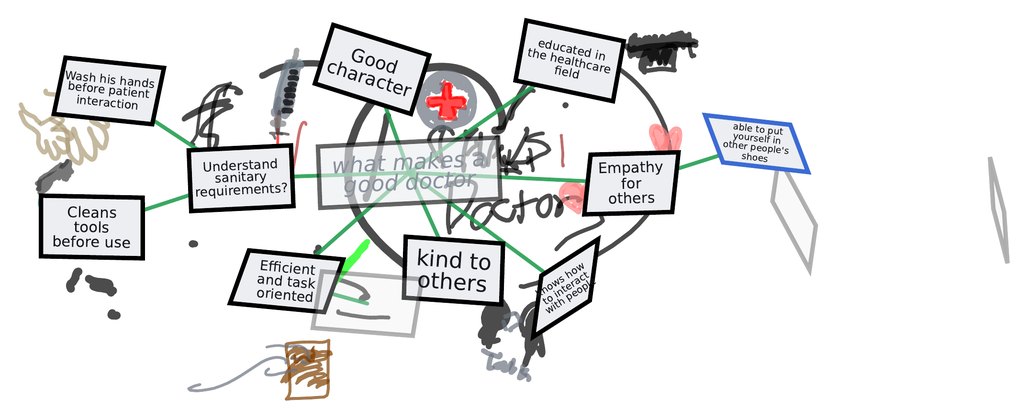
Global view: every subgroup sees all work. Local view: only its own. Room, task and voices stay the same.
A Year 2 Session, Rebuilt From Its Recording
Replayed from one Year 2 session's network recording, at 24× speed; no camera footage
Children Claimed Territories and Rarely Touched a Groupmate's Work
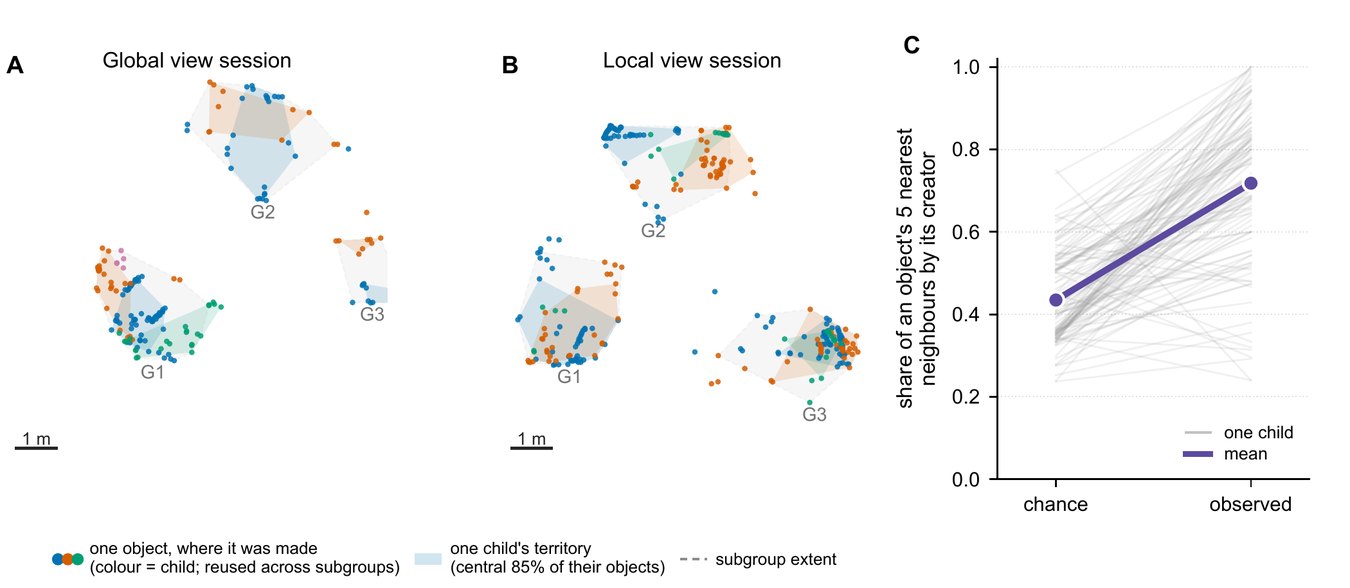
Territories
0.72 of an object's nearest neighbors were the same child's, against 0.43 by chance
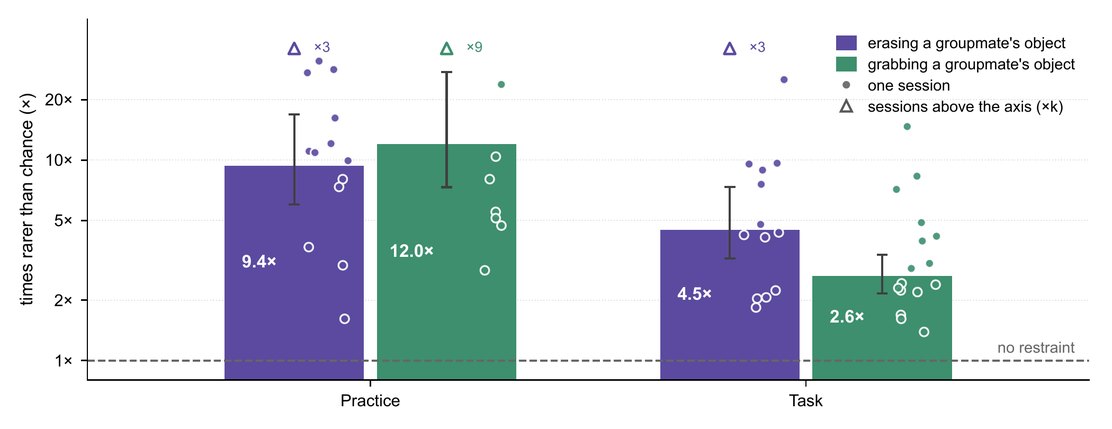
Ownership restraint
Erasing a groupmate's object was 9.4× rarer than chance in practice, 4.5× in the task
Grabbing: 12.0× and 2.6× rarer; in both views
Seeing Other Subgroups' Work Did Not Reliably Change Production
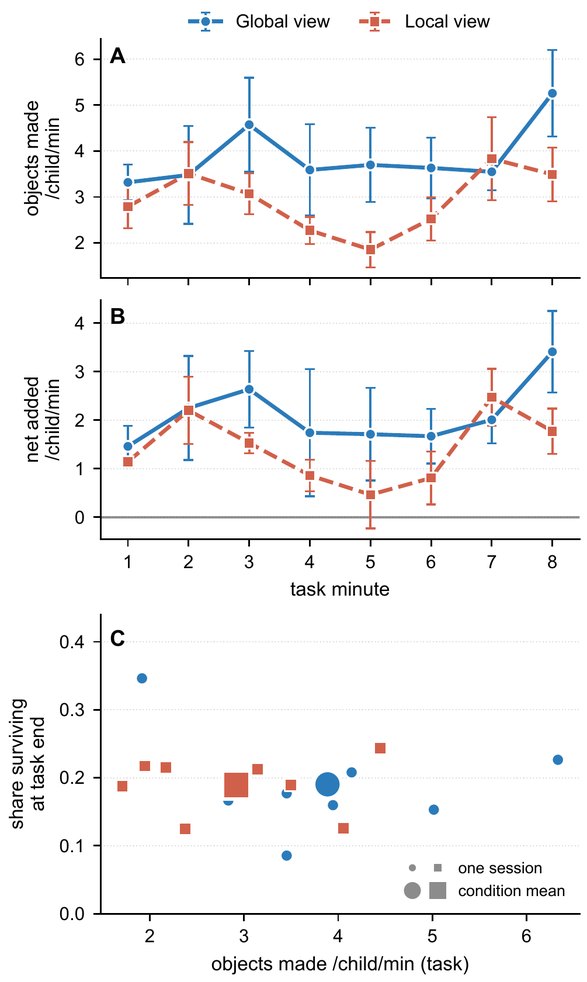
Global vs local view
Descriptively more objects per child in the global view, but session-level tests did not confirm it (p = .162)
A candidate effect for confirmation: 16 sessions could detect only large differences
Dominance is multimodal
Children who moved more also spoke more (r = .39) and drew more (r = .46)
Speaking and drawing were unrelated (r = .10, p = .153), so word counts couldn’t point at the most active users
Participant Speech Lined Up With Their Behavior
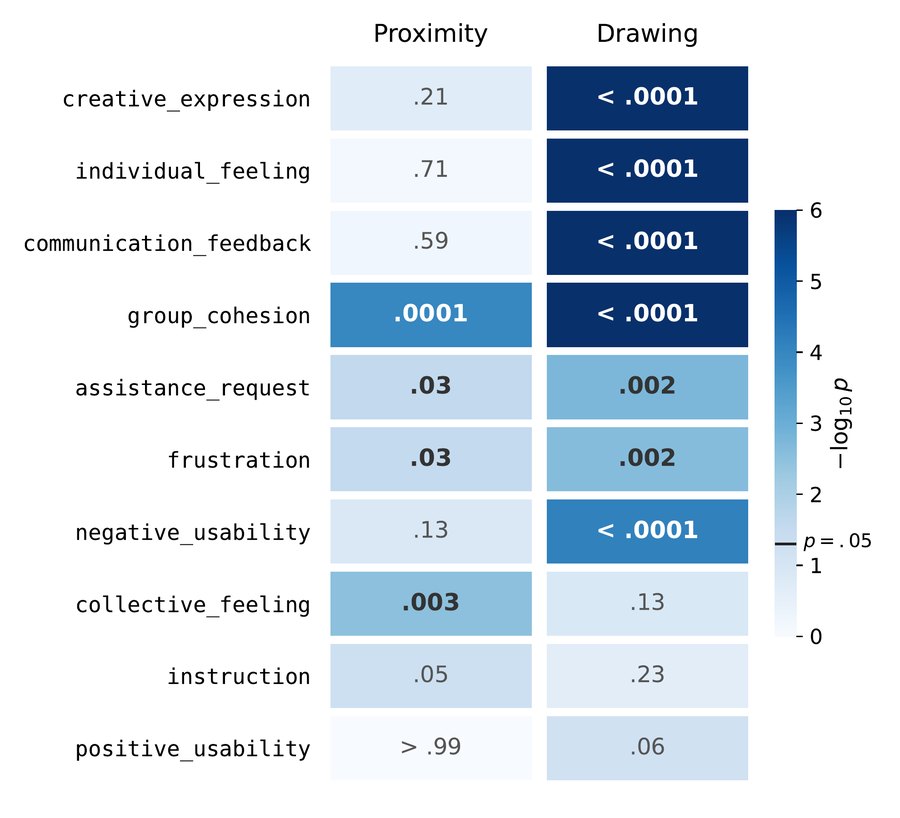
Affiliation talk happened closer together
Group-cohesion talk at a nearest-neighbor distance of 1.12 m, against 1.26 m for other talk
Creation talk happened while drawing
71% of creative-expression talk while drawing, against a 59% baseline
Year 1 open-mic speech, 2,894 units coded by the pipeline (Ch. 2)
Future Work

Validate with a physical robot
Check whether the self-efficacy built in MR carries over to programming a real robot, with delayed measures of competence.

Test the pipeline across XR experiences
Run the speech-coding pipeline on a range of XR experiences, and validate it against independent human coders.

A live version inside XR
Code speech and telemetry while a session runs, so that an instructor, or the system, can respond when a learner needs help.

Shared physical and virtual equipment
Collaboration around physical and virtual equipment, for example several learners, co-located and remote, with one physical robot.
Thank You

Guidance
Major professor: Dr. Kyle Johnsen
Committee: Dr. John Morelock, Dr. Beshoy Morkos, Dr. Fred R. Beyette Jr.
Master's advisor: Dr. Eric Freeman
Instructors who invited their students: Dr. Mike Yoder, Dr. Qin Liu, Dr. John Mativo, Dr. Alisson Banka, Dr. John Brocato
The students and summer-camp participants who took part

Coauthors and labmates
Coauthors: Yuqian Ni, Jordan Smothers, Sun Joo (Grace) Ahn, John Morelock, Deborah Moyaki, Ethan Bowmar, Beshoy Morkos
Virtual Experiences Laboratory, past and present: Dr. Catherine Ball, Dr. Anton Franzluebbers, Dr. Brook Bowers, Dr. Javier Rodriguez-Sanchez, Yulong Wang, Jordan Smothers, Ethan Bowmar, Ollie Fairlamb, Alec, Bodey
Administrative help: Melissa Connell, Margaret Sapp, Victoria Martinez
Thank You

Funding and support
Georgia Artificial Intelligence in Manufacturing (Georgia AIM), supported by the U.S. Economic Development Administration, and its Innovation Factory
UGA College of Engineering, through my teaching duties
Dean's Engineering Education Fellowship (DEEF)
Engineering Education Transformations Institute (EETI), for the study rooms, including the Education Innovation Lab

Friends and family
UGA club soccer and the Athens soccer community, teammates and fierce opponents alike
The African Graduate Students' Forum (AGSF) and the Kenyan community
My brothers John Kinyua, Geoffrey Mugambi, and Vincent Mwenda, and the rest of my family
My wife, Joy
Beyond the Research: Awards, Teaching, and Service

Awards
• Dean’s Engineering Education Fellowship (DEEF)
• Best Paper, I/ITSEC 2020 (Simulation), Virtual Family Room
• Best Paper, ASEE 2023 (Computers in Education), AR robot paper
• Outstanding TA Award (2025)

Research impact
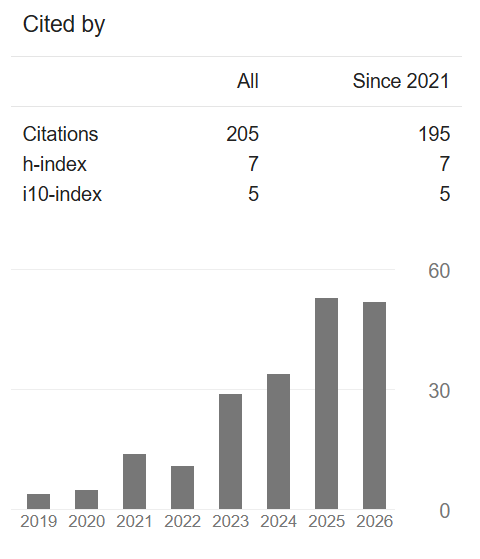
Google Scholar, October 2026
• Two apps on the Meta Horizon Store: DrawnTogether and GAAIMVignette

Teaching and leadership
• Instructor of record, INFO 2000, three semesters
• Mentored ~10 undergraduate students
• Founding member, African Graduate Students’ Forum (AGSF)
• Vice president, Engineering Graduate Club


Club soccer
• National finalist with UGA, college club soccer (2025)
Contributions and Questions for Discussion
Contributions
1
Infrastructure for multi-user MR studies: shared-space alignment, networking on local servers, and session logs that reconstruct each experience.
2
An auditable and repeatable pipeline using open-weight models to code participant speech (several requests to apply it to studies in progress). Applied to study data.
3
Demonstrated that situated isomorphism can enhance the self-efficacy acquired by participants when learning procedural tasks.
4
Showed that group MR studies can run in the field at scale: up to 16 co-located headsets, 170 adolescents and 26 sessions, with territories and ownership restraint as the clearest group behaviors.

Stuck? Borrow a question 🙂
Is the MR advantage just novelty?
Why an ensemble, if the best single model scores higher?
What would another lab need to adopt the pipeline?
Why did visibility not matter?
Andrew Rukangu · andrew.rukangu@uga.edu · presentation.rukangu.com · Google Scholar: Andrew Rukangu
Backup Slides
Hidden in the slide show; open them from the slide sorter when a question calls for one.
Research Questions: What We Found
RQ1
Can XR speech be coded at scale with a human-authored codebook and analyzed with telemetry? (Ch. 2)
Answered
Ensemble vs the expert calibrator: α = .76 (CS-Robot). Run frozen on public corpora: inside the human panel on AnnoMI therapist behavior, above 7 of 11 raters on GoEmotions. Coded speech tracked telemetry (creative expression with drawing). The best single model beat the ensemble on all 9 uncalibrated tests.
RQ2
How does a life-size virtual robot shape novices' motivation and self-efficacy? (Ch. 3, 4)
Answered
Study 1, watching: students tied the physical robot to usefulness and the AR robot to interest. Study 2, programming: MR raised self-efficacy more than the desktop (+1.10 points, p = .002), with lower overall workload (p = .020).
RQ3
How do adolescent groups behave in co-located MR, and does seeing other subgroups' work change it? (Ch. 5)
Partly
Children claimed territories: 0.72 of an object's nearest neighbors were their own, against 0.43 by chance, and erasing a groupmate's object was 9.4× rarer than chance. Seeing other subgroups' work: no reliable production difference (p = .16, .10), a candidate effect.
Chapters 2 to 5
Study 2 Hypotheses: Outcomes and Evidence
H1
MR raises self-efficacy more than the desktop (RQ1)
Supported
Gain 6.54 vs 5.44: +1.10 [0.44, 1.77], W = 22.5, p = .002, r = .66. Held in first sessions alone (ANCOVA +1.02, p = .034); no order effect on gain (p = .78).
H2
MR raises physical demand but lowers frustration and mental demand (RQ2)
Not supported
Overall workload was lower in MR (p = .020, r = .50), but physical demand did not differ (1.36 vs 1.55, p = .23), mental demand did not differ, and lower frustration (p = .017) did not survive Holm correction.
H3
Presence correlates with self-efficacy gain (RQ3)
Supported (caveat)
r_rm = .56 [.19, .79], p = .005, but it rides on the modality contrast: presence added nothing beyond modality in a mixed model (p = .20), and presence shifts did not predict gain shifts (r = .12).
Chapter 4 (Results)
Theoretical Framework: CAMIL, Self-Efficacy, and MUSIC
Features
Immersion
Learner control
Representational fidelity
Affordances
Presence
Agency
Cognitive and affective factors
Situational interest
Intrinsic motivation
Self-efficacy
Embodiment
Cognitive load
Self-regulation
Outcome
Learning
Bandura: four sources of self-efficacy
Performance accomplishments (mastery), vicarious experience, verbal persuasion, and physiological states. Mastery is the most influential, and CAMIL proposes that presence and agency can make immersive practice feel like mastery.
MUSIC: motivation to engage in learning
eMpowerment, Usefulness, Success, Interest, and Caring. Success relates closely to self-efficacy, and eMpowerment parallels CAMIL’s agency. Both robot studies’ interviews used four components (not Caring).
Study 2: presence and gain rose together, but presence added nothing beyond the interface (p = .20); gains tracked how quickly learners succeeded (exploratory).
Chapter 1 (Makransky and Petersen, 2021; Bandura, 1977; Jones, 2009); Chapter 4 and Appendix C
The Pipeline Serves Codebook Coding, Not All Qualitative Analysis

Built for: codebook coding (coding reliability)
A human-authored codebook is applied to every unit. Claims rest on how often codes occur and co-occur, so consistency and agreement (Krippendorff’s α) matter.

Not a replacement for: reflexive thematic analysis
The researcher’s interpretation is the instrument, so agreement between coders is not a coherent goal.
Not needed for: grounded theory and saturation
Data are collected in waves until new data no longer change the results. Small, purposeful samples are the design, so there is no large corpus to code.
In every case, the human writes the codebook, calibrates the models, and interprets the results.
Chapter 2 (Braun and Clarke, 2021; Krippendorff, 2004); Chapter 3 (Strauss and Corbin, 1998; Miles et al., 2014)
Study 2: Presence by Interface
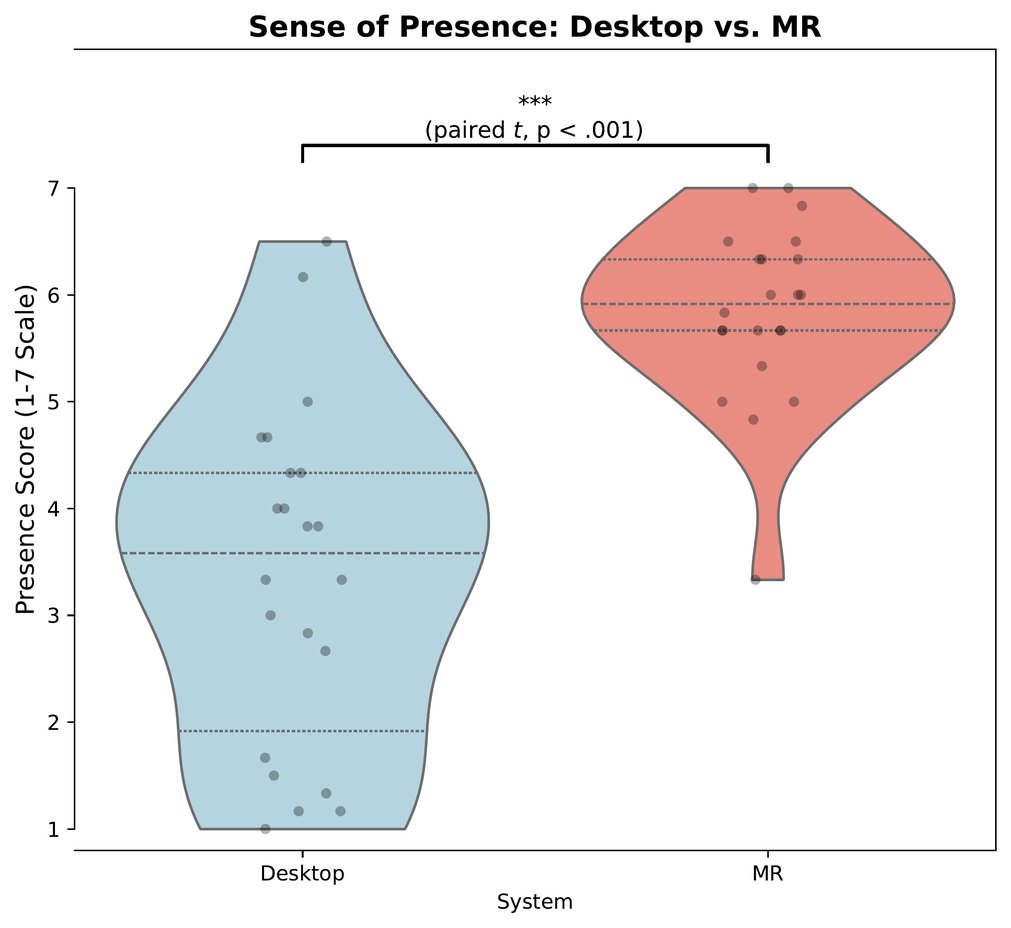
Chapter 4, Appendix C (presence_violin)
Study 2: Workload Subscales
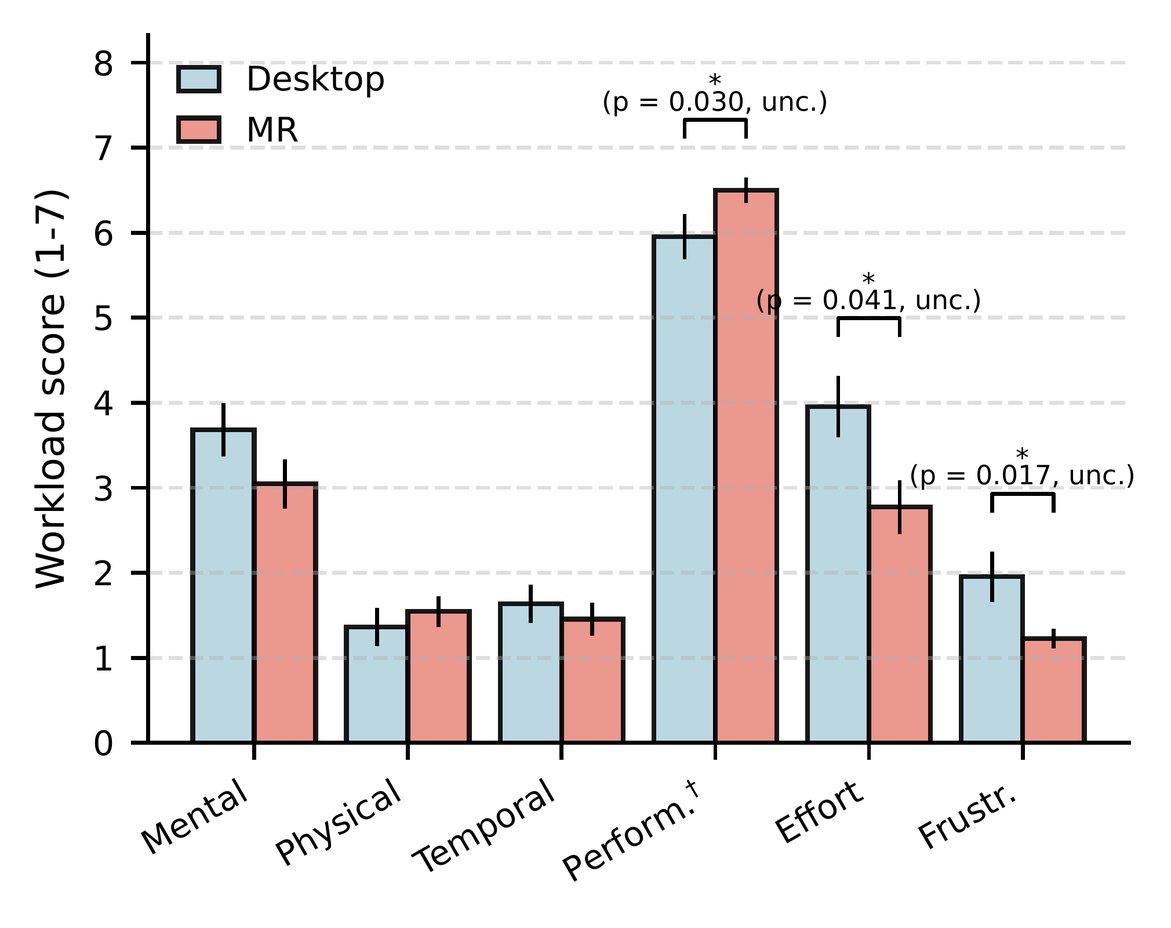
Chapter 4 (TLX profile); no subscale survived the Holm correction
Study 2: Presence and Self-Efficacy Gain
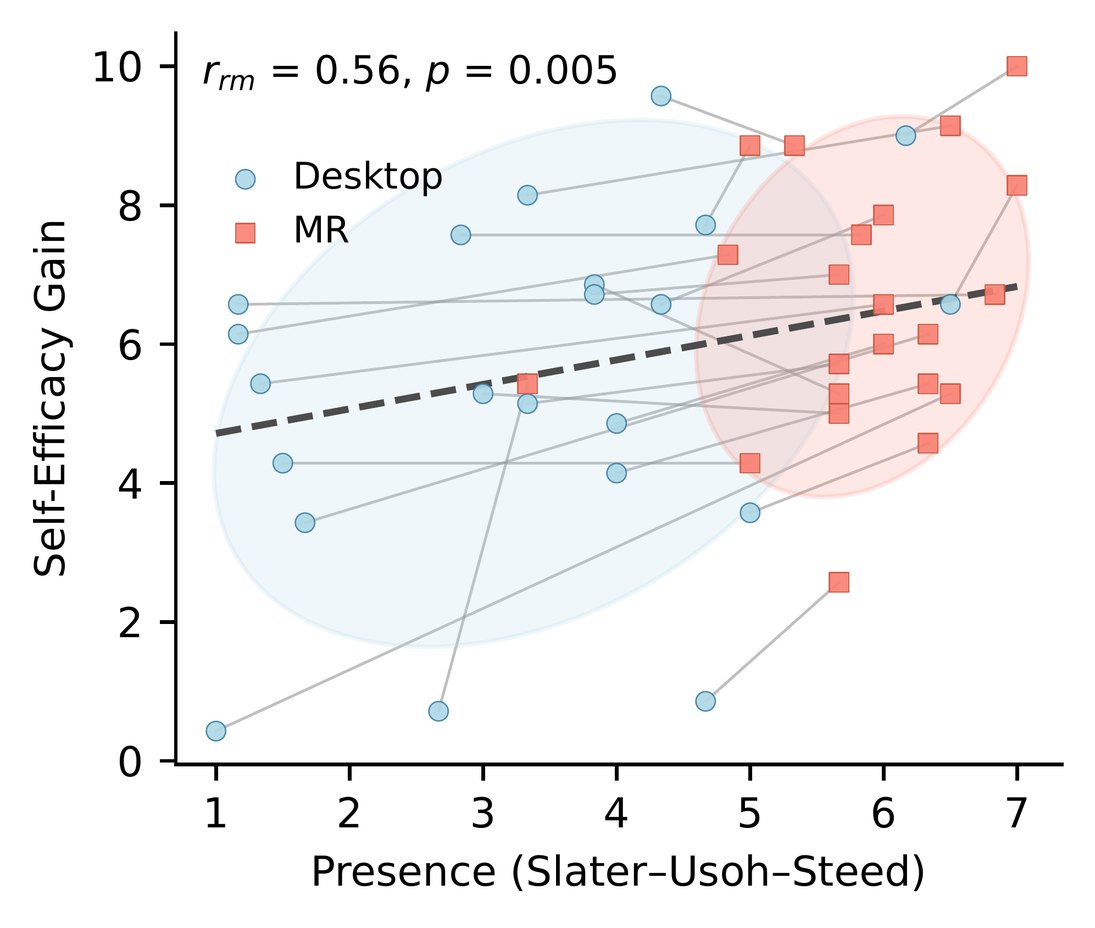
Chapter 4 (repeated-measures correlation, r_rm = .56)
Study 2: Self-Efficacy Gain Versus Workload
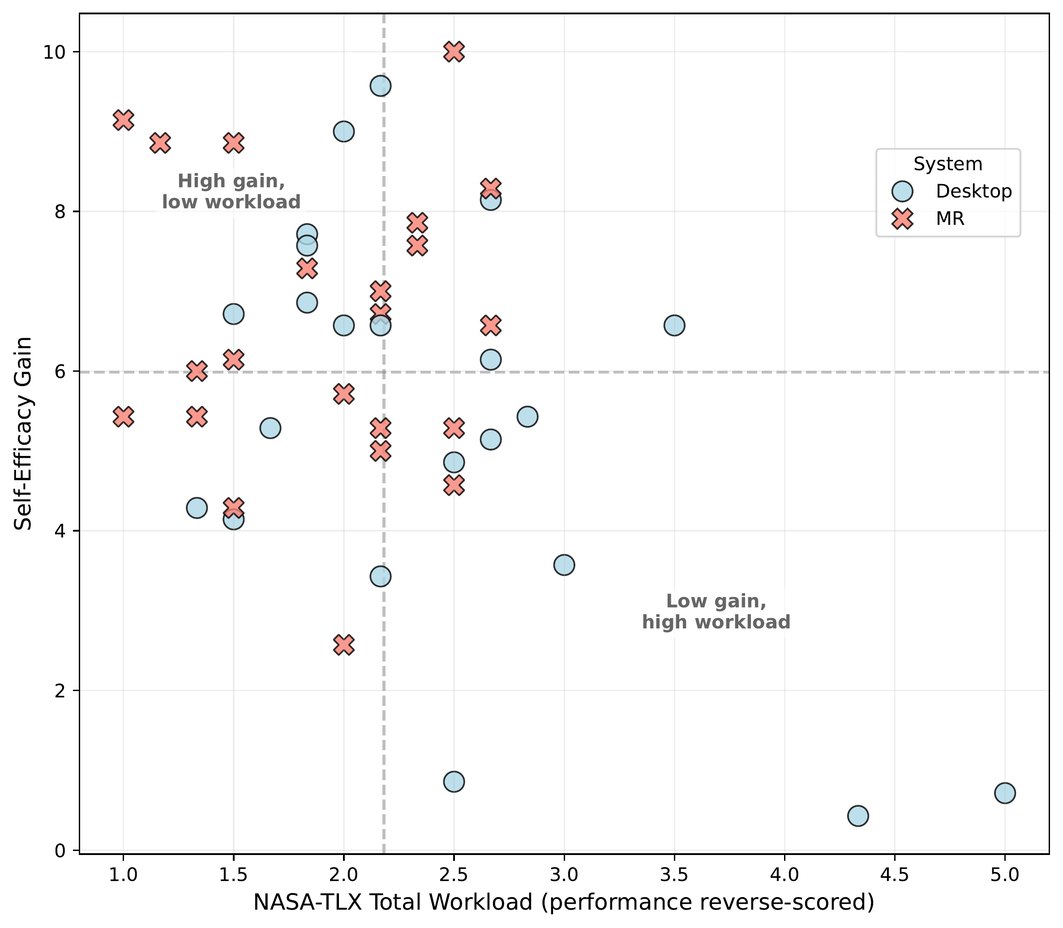
Chapter 4, Appendix C (efficiency matrix)
Study 2: Coded Themes Versus Self-Efficacy Gain
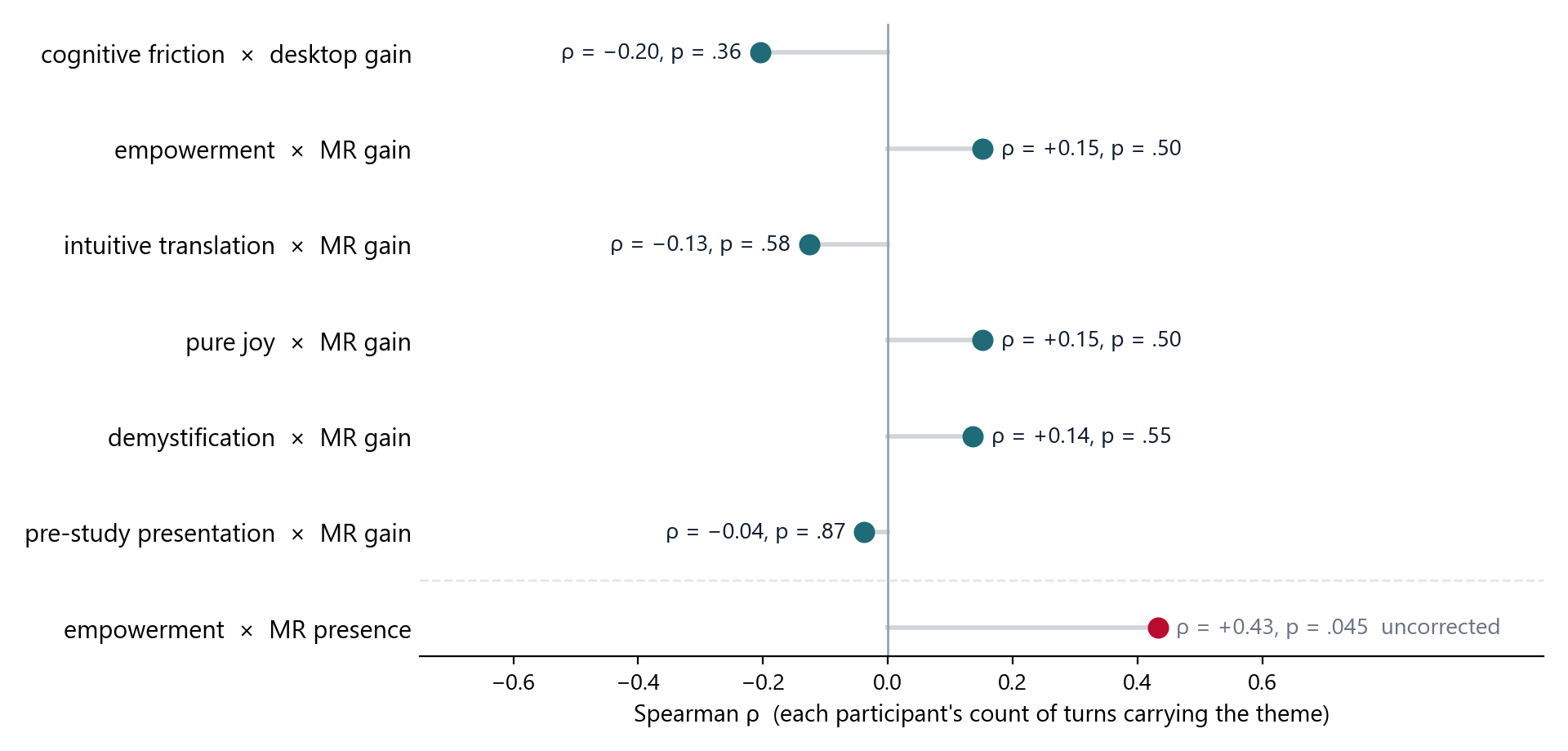
Exploratory (VR27 analysis notebook, section 7) · Spearman, n = 22 · none survives Holm correction across 10 tests
Study 2: Net Promoter Score by Interface
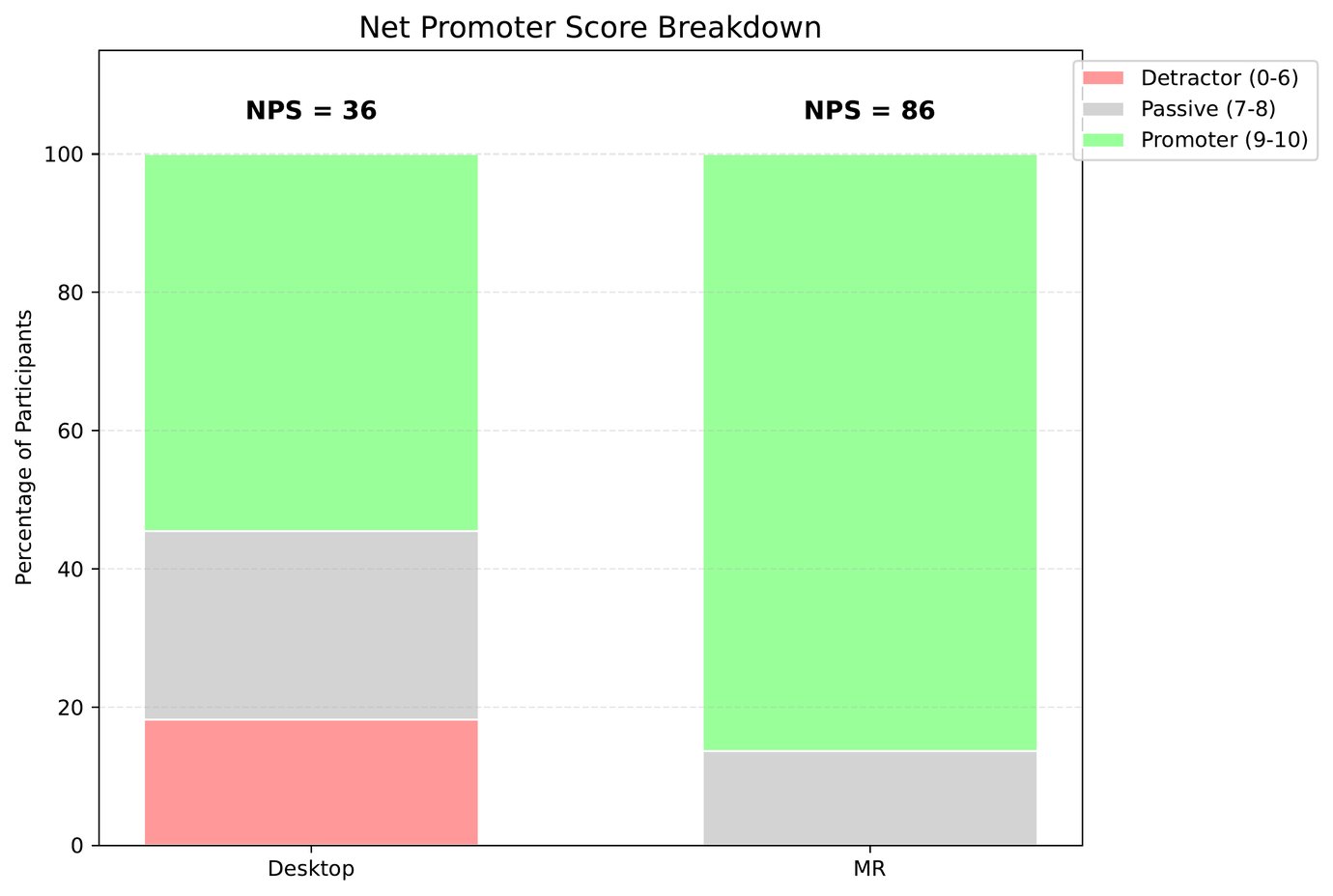
Chapter 4, Appendix C (NPS)
Study 1: Resets per Participant
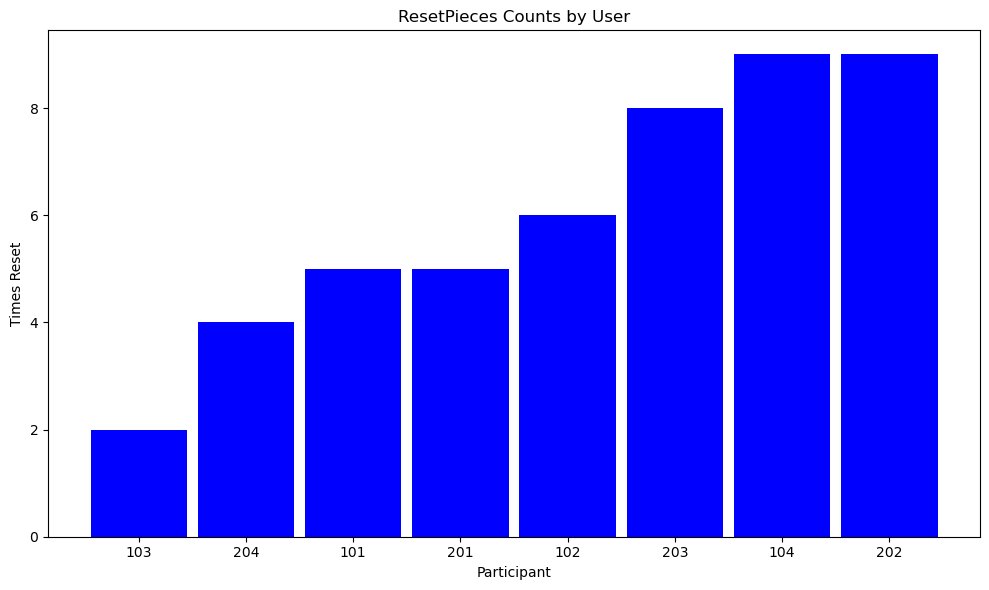
Chapter 3 (resets as a proxy for solution attempts)
Study 1: Pendant Program and Desktop Program
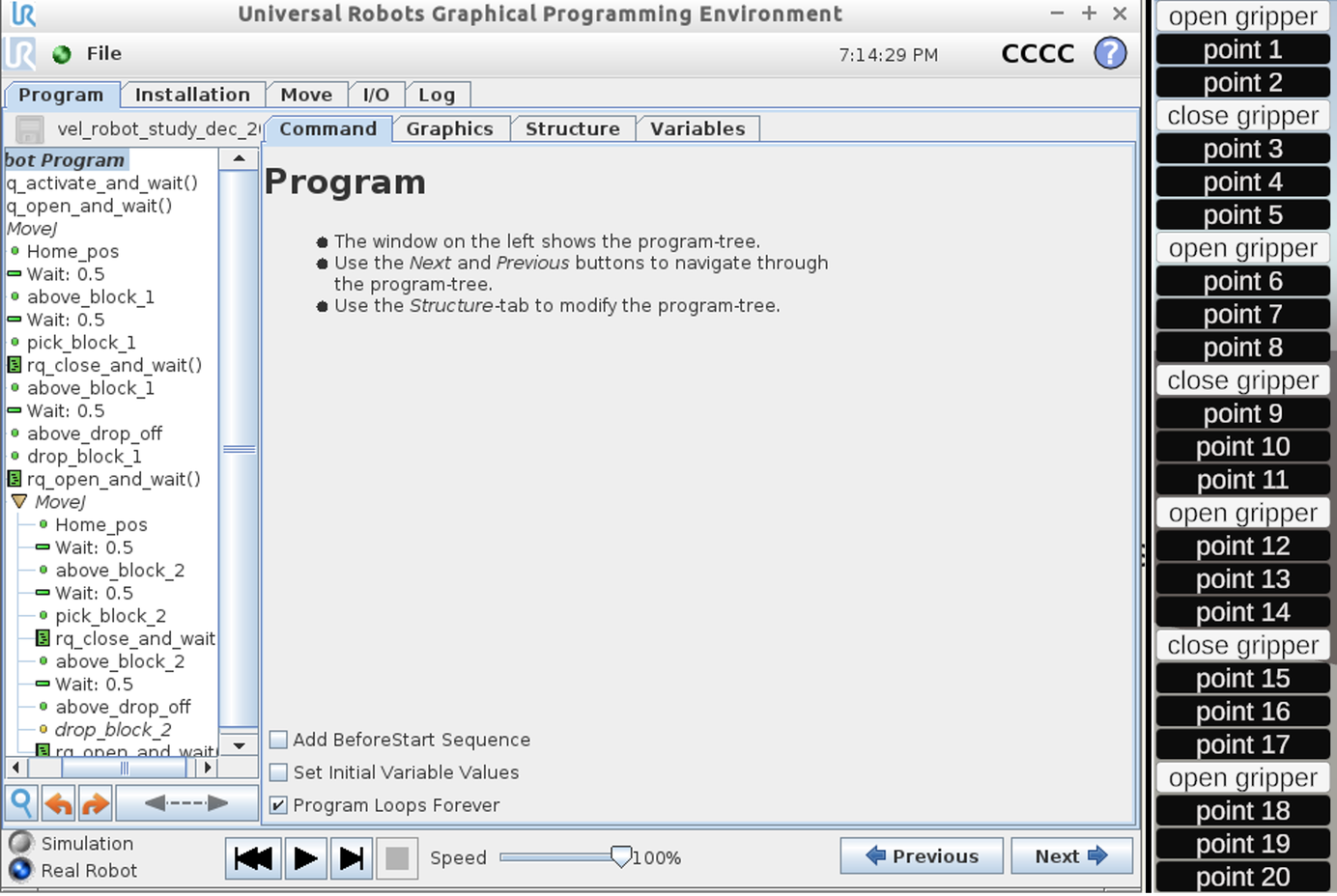
Chapter 3 (physical pendant program, left; desktop program, right)
Study 2: Statistical Methods, Surveys and Behavior
Method
Applied to
Key result
Shapiro–Wilk on paired differences
Choosing a t-test or Wilcoxon
Workload differences non-normal (p = .011), so Wilcoxon
Paired t-test with d_z
Usability; presence
t(21) = 3.90, d_z = .83; t(21) = 7.20, d_z = 1.53
Wilcoxon signed-rank with r
Self-efficacy gain; workload
W = 22.5, p = .002, r = .66; W = 48.5, p = .020, r = .50
Mixed ANOVA, modality × order
Period and carryover effects
Interaction n.s. for gain (p = .50); order main effect: usability p = .023, presence p = .001, gain p = .78
Baseline-adjusted first-period ANCOVA
Gain, first sessions only
+1.02 [0.09, 1.95], p = .034
Linear mixed model (modality + period)
Post-session self-efficacy
+1.10, z = 3.57; period p = .475
Holm correction
Six workload subscales
None survive
2×2 crossover model; stratified Cox model
Task times; time to first success
Condition p = .273; HR 1.94 [0.73, 5.10], p = .18
Sensitivity power analysis
The 22-participant design
80% power for d_z = 0.63 at α = .05
Study 2: Statistical Methods, Presence and Interviews
Method
Applied to
Key result
Repeated-measures correlation
Presence vs self-efficacy gain
r_rm = .56 [.19, .79], p = .005
Pearson r on paired differences
Presence shift vs gain shift
r = .12, p = .58
Mixed-model likelihood-ratio tests
Presence beyond modality, and modality beyond presence
p = .20 and p = .36
Exact McNemar tests, Holm across 12 themes
Participants voicing each theme per system
Six differences survive
Robustness checks on theme counts
Turn thresholds, question 7 removed, single-system turns, routing cutoffs, voting rules
The same six survive every check
Krippendorff's α
Ensemble vs the human calibrator, 30 turns
α = .76; members below .50 dropped
Cluster bootstrap, 10,000 resamples
Ensemble vs its best single model
Δα = +.016, p = .72
Cronbach's α
Seven-item self-efficacy scale
.87 / .93 / .79
Net Promoter Score
% promoters (9–10) minus % detractors (0–6)
Descriptive only, no test
Study 2 Codebook: The 12 Themes Tested
Theme (code)
Definition
Learners, MR vs desktop
music_interest
Enjoyable, fun, mentally stimulating, or intrinsically interesting content
20 vs 1, p < .001 *
3dui_intuitive_translation
Interaction felt natural; intent mapped easily to the system
22 vs 4, p < .001 *
physical_intuition
Moved the robot intuitively, or predicted its motion physically
22 vs 2, p < .001 *
pure_joy
Derived pure joy and fun from it
16 vs 0, p < .001 *
novelty
Experience was new and different from what they were used to
18 vs 0, p < .001 *
3dui_cognitive_friction
Mental struggle, confusion, slowness, or trouble turning intent into controls
desktop 20 vs MR 11, p = .004 *
music_success
Names what helped them succeed: strategies, features, factors
22 vs 16, p = .031
transfer_personal_relevance
Links training to own skills, resume, confidence, future robot use
19 vs 10, p = .035
demystification
Gained new understanding, or clarity on something previously confusing
14 vs 6, p = .039
music_usefulness
Key takeaways, relevance, or broader understanding of robotics applications
18 vs 11, p = .092
music_empowerment
Freedom to make meaningful choices; several options for a task
17 vs 11, p = .146
ui_input_precision
Exactness, clumsiness, accuracy, or responsiveness of input methods
15 vs 9, p = .146
Exact McNemar tests on learners (of 22); * survives Holm across the 12 themes. Definitions condensed from Appendix C, lines 553–591.
Study 2 Codebook: The Other 34 Codes
MUSIC and 3DUI (not tested)
3dui_physical_affordance
Valence (routes a statement to a system)
positive_AR · negative_AR · positive_desktop · negative_desktop
Hedonic and play
interactive_play
Scaffolding
prestudy_presentation · scaffolding_mental_model · scaffolding_procedural_progression · scaffolding_vocabulary · scaffolded_tutorial · scaffolding_in_system_aids · scaffolding_previous_experience_content · scaffolding_previous_experience_system
Transfer and career
transfer_general_industry · industry_perspective · career_skill
Affect
affect_positive · affect_negative
Fidelity and perception
fidelity_enhanced_trust · fidelity_functional · fidelity_induced_hesitation · fidelity_visual · visual_clarity · ergonomic_strain
Freedom and problem solving
learning_freedom · path_freedom · programming_freedom · problem_solving · task_problem_solving
Other
instructor_help · previous_experience · study_design_assessment · system_creation_curiosity
46 codes in all: the 12 themes plus these 34. Definitions are in the speaker notes (Appendix C, lines 553–624).
Study 2: MUSIC Codes Co-occurring with 3DUI Codes
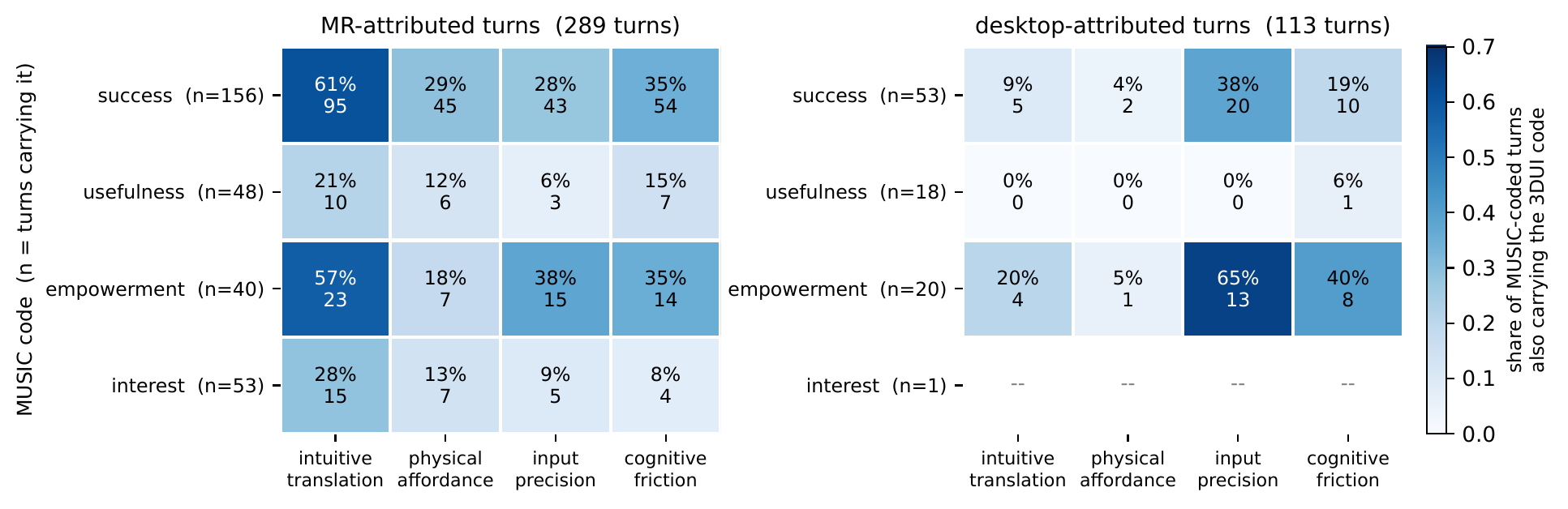
Appendix A (share of each MUSIC code's turns that also carry the 3DUI code; rows under five turns blanked)
Study 1 Codebook: MUSIC Components
MUSIC component
How it was coded in Study 1
eMpowerment
Activities gave them freedom to choose their own path and solution
Usefulness
Insight into real-world uses of robots, or skills useful for their careers
Success
Felt prepared to program a real robot, or completing the task felt like an accomplishment
Interest
Found the programming activities enjoyable, or the content intrinsically interesting
Caring
Not asked and not coded, because of the lab setting
Open-code themes
Desktop interface design · structure of the activities · the reinforcement system (physical or AR robot) · novelty
Chapter 3, lines 326–339 and 364; coded in MAXQDA with a priori MUSIC codes and open codes.
Study 1: Who Expressed Each Component
Component
Whole interview: AR group
Whole interview: physical group
About the AR robot
About the physical robot
About the desktop tool, all 8
Usefulness
4/4
4/4
2/4
3/4
5/8
Interest
4/4
4/4
3/4
3/4
8/8
Success
4/4
4/4
3/4
4/4
8/8
eMpowerment
4/4
4/4
0/4
0/4
7/8
Novelty
4/4
1/4
3/4
0/4
—
Every student expressed usefulness, interest and success somewhere in the interview, so the published contrast lives in what they said about the robot they watched: usefulness 3 of 4 for the physical robot against 2 of 4 for the AR robot, and novelty 4 of 4 for AR against 1 of 4 (Chapter 3, line 438).
Learners with at least one coded segment. Computed from the original 2023 MAXQDA coding (one coder); the robot and desktop columns count segments that overlap the analyst's “Observing life-size robot arm” or desktop-activity codes. These counts are not printed in the dissertation.
Year 1 Showed System Limitations; System Redesigned for Year 2

Year 1 broke the system
Children made an order of magnitude more objects than expected, and frame rates fell
The network queue dropped messages, so deleted objects stayed visible on some headsets
Logs were scattered across headsets; replaying one session took hours

Year 2 ran every session
One laptop records all traffic: under 100 MB per session, against over 2 GB before
All 16 sessions completed the full 8-minute task
One build ran all four days (across 4 weeks)